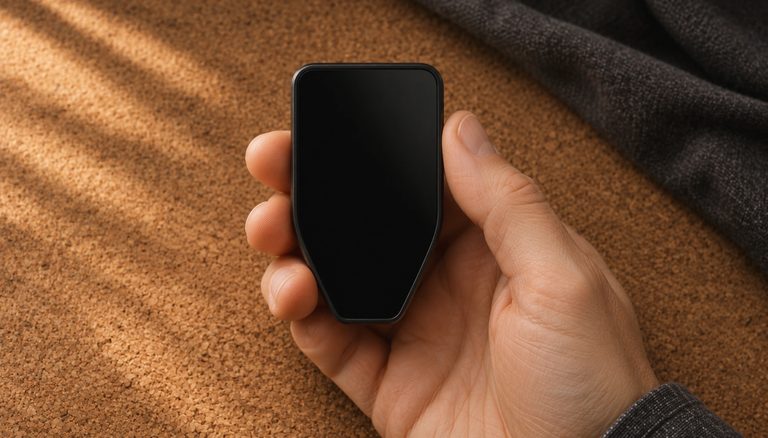
The Trezor Safe 5 is Trezor’s touchscreen hardware wallet, priced at $129 on Trezor’s own store (checked November 2026). It combines a color touchscreen, haptic feedback, an EAL6+ secure chip and open-source firmware. Since SatoshiLabs shipped the original Trezor One in 2014, Trezor has published its wallet code for anyone to read and audit; like the cheaper Safe 3, the Safe 5 has the secure chip that critics of older Trezors asked for. Above it sits the newer Trezor Safe 7 ($249), with a larger screen and Bluetooth. The Safe 5 is the device our free course recommends to beginners.
Updated 7 November 2026: prices are from the makers’ own stores (checked 3 November 2026), the backup section now describes the 20-word backup the Safe 5 makes by default, and the alternatives are the models on sale today (Trezor Safe 7, Coldcard Mk5). Trezor Suite’s CoinJoin feature ended on 1 June 2024 and is no longer listed.
Trezor Safe 5 Specifications
| Feature | Details |
|---|---|
| Price | $129 (Trezor store, November 2026) |
| Release year | 2024 |
| Screen | 1.54" color touchscreen (240×240), Gorilla Glass 3 |
| Connectivity | USB-C |
| Secure element | Infineon OPTIGA Trust M (CC EAL6+) |
| Haptic feedback | Yes (Trezor Touch) |
| Size and weight | 65.9 × 40 × 8 mm, 23 g |
| Body | PC-ABS plastic, tamper-evident casing, anodized aluminum backplates |
| Colors | Black Graphite, Violet Ore, Green Beryl |
| Firmware | Open source (GitHub); the secure chip’s own code is not |
| Companion app | Trezor Suite (desktop + web) |
| Editions | Bitcoin-only or Universal (multi-coin) |
| Default backup | 20 words, single share (SLIP-39). At setup you can choose 12 or 24 BIP39 words, or a multi-share backup |
Key Features
Open-Source Firmware
This is the Trezor Safe 5’s strongest differentiator. Trezor publishes its firmware on GitHub, so security researchers, developers and anyone with the skill can audit, compile and verify the code running on the device. The secure chip runs its own closed code from the chip maker, as most secure elements do. When you trust a device with your savings, being able to verify rather than trust is worth a lot.
Infineon OPTIGA Trust M Secure Element
Older Trezor models used a general-purpose STM32 microcontroller without a dedicated secure element, a persistent criticism: without a tamper-resistant chip, physical attacks such as voltage glitching were easier. In 2022 a hardware hacker used exactly that to pull the seed out of an old Trezor One running outdated firmware. The Safe 5 answers this with the Infineon OPTIGA Trust M, certified to EAL6+. Trezor chose it partly because it is “NDA-free”: its documentation is public, which lets Trezor publish all of its own code that talks to the chip.

Color Touchscreen with Haptic Feedback
The 1.54-inch color display is protected by Gorilla Glass 3, making it scratch-resistant and durable. When you click Verify in Trezor Suite, the full address appears on this screen for you to compare. The Trezor Touch haptic engine provides physical vibration feedback when you tap, which makes the device feel more responsive and helps confirm actions during transaction signing. It’s a small detail that significantly improves the interaction quality.

Bitcoin-Only Firmware
Trezor sells the Safe 5 in a Bitcoin-only edition. Its firmware contains no code for other coins, so there is less code that could hold a bug. For Bitcoin holders who want nothing on their signing device except what bitcoin needs, this is the edition to pick; the BitBox02 offers the same choice, and every Coldcard is Bitcoin-only. See our open-source wallet analysis for why this matters.
Trezor Suite and Tor Support
Trezor Suite is the companion app for sending, receiving and coin control (choosing which coins a payment spends). The desktop version has Tor built in, so you can route all wallet traffic through Tor and hide your IP address. If you run your own Bitcoin node, Suite can connect to your own Electrum server instead of Trezor’s. Trezor Suite’s CoinJoin feature ended on 1 June 2024, when the coordinator it relied on shut down.

Backup: 20 Words by Default, Shamir Optional
By default the Safe 5 makes a 20-word backup in a standard called SLIP-39. It restores on Trezor devices and on wallets such as Sparrow, Electrum, BlueWallet and the Keystone hardware wallet, but not on Ledger or Coldcard. If restoring on other brands matters to you, choose a 12- or 24-word BIP39 backup from Trezor Suite’s backup format option when you create the wallet.

SLIP-39 also allows a multi-share backup (Shamir’s Secret Sharing). You split the backup into several shares, for example any 3 of 5, kept in different places. You need the threshold number of shares to recover, and fewer shares reveal nothing about the wallet. It suits inheritance planning and spreading a backup across locations, and it’s easy to get wrong in a way that locks you out, so start with a single backup and learn it first.

Pros and Cons
Pros
- Open-source firmware — Trezor’s code is public on GitHub for anyone to audit
- EAL6+ secure chip — resists physical extraction; its documentation is public (NDA-free)
- Bitcoin-only edition — less code on the device for Bitcoin-focused users
- Color touchscreen with haptic feedback — responsive and clear address verification
- Gorilla Glass 3 and aluminum backplates — solid build quality
- Trezor Suite with Tor support — strong privacy features in the companion app
- Multi-share backup option — Shamir shares for advanced setups
Cons
- No Bluetooth — USB-C only (the Trezor Safe 7 adds Bluetooth)
- Smaller screen than Ledger Flex — 1.54" vs 2.8" (still shows full addresses)
- No air-gap capability — cannot operate via QR codes or microSD like Coldcard
- 20-word default backup — doesn’t restore on Ledger or Coldcard unless you choose 12 or 24 BIP39 words at setup
- More than twice the price of the Safe 3 — the Safe 3 ($59) has the same secure chip and firmware
- Not as discreet to carry — larger than the old Trezor One, though still pocket-friendly
Trezor Safe 5 vs Alternatives
Safe 5 vs Trezor Safe 3
The Safe 3 ($59) includes the same Infineon OPTIGA secure chip and runs the same open-source firmware. What you lose is the color touchscreen (replaced by a 0.96" monochrome OLED and two buttons), haptic feedback and Gorilla Glass. If budget matters more than comfort, the Safe 3 delivers the same core security for less than half the price.
Safe 5 vs Trezor Safe 7
The Trezor Safe 7 ($249) is Trezor’s newest model. Trezor lists a 2.5" color touchscreen, encrypted Bluetooth, Qi2-compatible wireless charging and a second secure chip, TROPIC01, which it presents as independently auditable. It’s the Trezor to look at if you want to sign from your phone. We haven’t reviewed it hands-on; for most people the Safe 5 does the same core job for $120 less.
Safe 5 vs Ledger Nano X
The Nano X ($99) is $30 cheaper and adds Bluetooth for the Ledger Wallet phone app. But its firmware is closed source, its small OLED screen needs scrolling to check an address, and its secure chip is certified EAL5+, one level below the EAL6+ chips in the Safe 5 and in Ledger’s newer models. For transparency and address checking, the Safe 5 is the better device for a small difference in price.
Safe 5 vs Coldcard Mk5
The Coldcard Mk5 ($269, $219 on sale), which replaced the Mk4, goes further on security: two secure chips from different makers, air-gapped signing via microSD, and Bitcoin-only by design. It suits experienced users. It has no app of its own, so you pair it with Sparrow or Electrum. Its code is public to read, under a licence that forbids selling it, which makes it “source-available” rather than open source in the strict sense. The Safe 5 counters with a better screen, an easier learning curve and Trezor Suite. Before using any Coldcard, read our July 2026 Coldcard advisory. Choose the Safe 5 for ease of use, the Coldcard for air-gapped signing; our Coldcard comparison covers the Mk5 and the Q.
Who Should Buy the Trezor Safe 5?
The Safe 5 is the best all-around hardware wallet for someone who values open-source transparency without sacrificing usability. It hits a sweet spot: you get a modern touchscreen experience, a proper secure element, and wallet firmware that anyone can read and verify. If you want a single device recommendation for a Bitcoin holder who cares about doing things right, this is it.
The main reasons to look elsewhere: if you need Bluetooth (Trezor Safe 7 or a Ledger), if you want air-gapped operation (Coldcard, Keystone 3 Pro or Blockstream Jade Plus), or if budget is tight (Trezor Safe 3). Buy it new from Trezor’s own store, trezor.io: in October 2026 a hidden implant that copies the recovery words was found in a Ledger sold by an authorised reseller, and Trezor has a credible report, not yet examined in its lab, of a similar implant in a Safe 5 from the same reseller (our advisory). For a comprehensive comparison, see our hardware wallet buying guide.

Verdict
The Trezor Safe 5 fixed the main criticism of older Trezor devices. It now has a proper secure chip, a responsive touchscreen and durable construction, while keeping the open-source firmware Trezor has published since 2014. At $129, it costs a little more than the Ledger Nano X ($99) and about half as much as the Ledger Flex ($249), while offering something neither Ledger can: firmware you can verify. Know before you set it up that it makes a 20-word backup by default.
Rating: 9/10 — The best balance of security, transparency, and usability in 2026.
Frequently Asked Questions
Is the Trezor Safe 5 secure enough for large Bitcoin holdings?
Yes. The EAL6+ Infineon OPTIGA secure chip protects against physical attacks, and because the firmware is open source, independent researchers can look for bugs in it. For very large holdings, pair the Safe 5 with a multisig setup using devices from different manufacturers. See our multisig setup guide for details.
Does the Trezor Safe 5 work with Sparrow Wallet?
Yes. The Safe 5 is fully compatible with Sparrow Wallet, Electrum, and other third-party Bitcoin wallet software. You are not locked into Trezor Suite — you can use whatever coordinator software you prefer.
What’s the difference between Trezor Safe 5 and Trezor Safe 3?
Both share the same open-source firmware and Infineon OPTIGA secure chip. The Safe 5 adds a 1.54" color touchscreen (vs a 0.96" monochrome OLED), haptic feedback and Gorilla Glass 3. The Safe 3 uses two physical buttons for navigation. If comfort matters, get the Safe 5. If you want the same core security for $59, the Safe 3 delivers.
Can the Trezor Safe 5 operate air-gapped?
No. The Safe 5 requires a USB-C connection to communicate with your computer. It does not support QR code scanning or microSD-based transaction signing. If air-gapped operation is a priority, consider the Coldcard Mk5 or Coldcard Q, the Keystone 3 Pro or the Blockstream Jade Plus.
Will my Trezor Safe 5 backup restore on another brand?
It depends on the backup you chose at setup. The default 20-word SLIP-39 backup restores on Trezor devices and on wallets that support SLIP-39, such as Sparrow, Electrum and Keystone, but not on Ledger or Coldcard. A 12- or 24-word BIP39 backup, which Trezor Suite offers as a backup format option when you create the wallet, restores on most brands.
For more, read our hardware wallet comparison chart and our detailed self-custody guide.