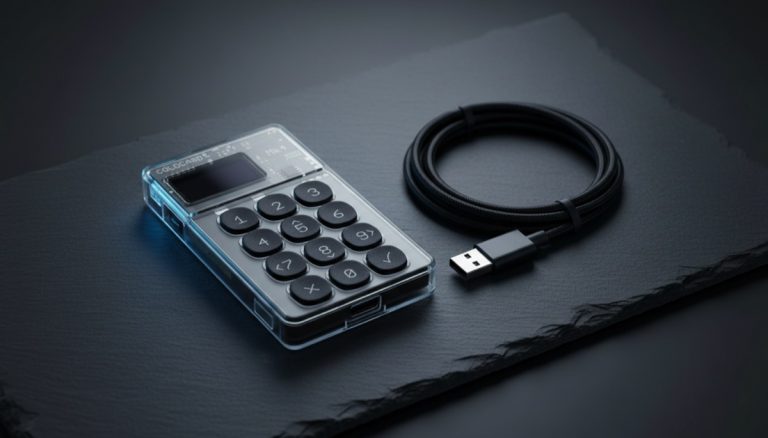
Short answer: If you hold more bitcoin than you'd be sick to lose and couldn't easily replace, yes — get a hardware wallet now. Below that line, a well-backed phone or software wallet is genuinely fine to start with, and rushing to spend $60–$150 on a device for $200 of bitcoin is not where your risk actually is. The real threshold isn't a fixed dollar figure; it's the moment the coins become savings rather than pocket money. Cross that line and the device pays for itself the first time it stops a single mistake.
You keep hearing "not your keys, not your coins" and "get a hardware wallet" — but you have a couple hundred dollars in bitcoin and a hardware wallet costs nearly as much as a fancy dinner. Is the device overkill, or are you one phone theft away from losing everything? This page answers the question that every buying guide skips: do you need one yet, or not? We'll give you a clear rule, the honest math, what the device actually looks like in your hands, and — if you land on "yes" — exactly where to go next.
The one threshold rule
Forget percentages and price charts. The decision comes down to a single honest question:
Would losing this bitcoin — to a stolen phone, a wiped laptop, or a piece of malware — genuinely hurt your finances, and could you not just shrug and rebuild it?
- If yes — it's meaningful money you couldn't casually replace — then yes, you need a hardware wallet. The device exists precisely to take your private keys off the internet-connected gadget that gets lost, hacked, or compromised.
- If no — it's an amount you'd be annoyed but not wounded to lose, money you're using to learn — then a free phone wallet, backed up properly, is fine for now. The device is not your highest-priority spend yet.
That's the whole rule. Everything below explains why it's drawn there, what a hardware wallet does and doesn't protect, what using one actually feels like, and how to cross the line cleanly when you reach it. If you want the deeper hot-vs-cold framing, our guide on cold vs hot wallet security covers the trade-offs in detail.
What a hardware wallet actually protects against (and what it doesn't)
A hardware wallet is a small dedicated device that generates and stores your private keys offline, and signs transactions internally so the keys never touch an internet-connected computer or phone. That single design choice is what it's buying you.
What it protects against:
- Malware on your phone or computer. Even if your laptop is riddled with keyloggers and remote-access trojans, the keys aren't on the laptop. An attacker who fully owns your machine still can't sign a transaction without your physical button press on the device.
- A stolen or lost phone. Your bitcoin doesn't live on the phone, so losing it isn't losing your coins.
- Address-swap attacks at the moment of sending. The device shows you the real destination address on its own screen — a display malware on your computer cannot rewrite — so you can catch a swap before you approve.
What it does not protect against — and this is the honest part most sellers skip:
- You losing the seed phrase, or never backing it up. The device is replaceable; the 12 or 24 words are the actual money. Lose those with no backup and the hardware wallet doesn't save you.
- You getting tricked into typing your seed into a fake app or "support" chat. A device can't stop you handing the keys away. Social engineering walks right past it.
- You approving a malicious transaction without reading the device screen. The screen only protects you if you actually check it.
Read that carefully, because it reframes the whole decision: a hardware wallet is a tool for the remote-attacker and device-compromise threats. Your seed-phrase discipline is what handles the rest — and that discipline matters whether you own a device or not.
One table that settles it: who actually stops each threat
The honest version of "do I need a device" is really "which of my risks does a device remove, and which are still on me?" This is the whole article in one place — and notice how many high-impact rows land on you, not the gadget.
| Threat | Does the hardware wallet stop it? | What actually stops it |
|---|---|---|
| Remote malware / keylogger on phone or PC | Yes — keys never on the machine; physical confirm required | The device |
| Clipboard / address-swap at send time | Partly — only if you verify the address on the device screen | Device screen + your verify-every-time habit |
| Lost or stolen phone | Yes — the keys aren't on the phone | The device + its PIN |
| Lost or never-made seed backup | No | Your backup discipline (paper/metal, tested) |
| You typing the seed into a fake app/site/"support" | No | Your seed hygiene — never enter it anywhere |
| Tampered / pre-seeded device from a reseller | No — it's already compromised | Buying direct + generating your own seed on first boot |
| Coercion / "$5 wrench" physical threat | No | Privacy + an optional passphrase / decoy wallet |
If your honest fear lives in a "Yes" row, the device is doing real work for you. If it lives in a "No" row, a device alone won't save you — the habit will.
A walkthrough of the exact moment the device earns its keep
Forget the marketing. Here is what actually happens, second by second, the first time you send bitcoin with a hardware wallet:
- You paste a destination address into the wallet app on your phone or laptop, the way you always have.
- The app doesn't send anything yet. It hands an unsigned transaction to the device and asks it to sign.
- The device's own little screen lights up. It shows the destination address and the amount, and then it waits — nothing moves until you act.
- Here's the pivotal part: this is the one screen malware on your computer cannot rewrite, because it lives on a separate chip with no internet connection. Whatever your infected laptop thinks it's sending, the device tells you the truth.
- You compare the first few and last few characters on the device against what you intended to send, then physically press the button to approve.
Notice what you'll feel at step 5: a flicker of "do I really have to check this every time?" Yes. This 5-second check is the entire reason the device exists. Skipping it is like having a smoke alarm and pulling the battery to stop the chirping.
The panic moment, named: the address on the device screen looks like gibberish — something like bc1q...8h7x — and your stomach drops because you're sure you typed it wrong. Breathe. You are not reading the whole string. You are matching the first four and last four characters against the address you meant to use. An attacker who swapped your address has to change those characters to steal your money — so if the head and tail match what you intended, you're safe to press. That's it. The intimidating part of the screen is exactly the part you don't need to read in full.
When a phone or software wallet is genuinely fine to start
There's a quiet snobbery in Bitcoin that treats anyone without a hardware wallet as reckless. That's wrong, and it scares beginners into either overspending or freezing up. A free, well-chosen, properly-backed-up phone wallet is a perfectly responsible place to start when:
- The amount is small — money you're learning with, not savings.
- You've written the seed phrase on paper, by hand, offline, and confirmed you can read it back. (Most losses at this stage aren't hacks — they're people who never backed up and then changed phones.)
- You're using it like cash in your pocket: small, spendable, occasionally moving.
But "a free wallet is fine" is only true if you do four concrete things, because the most vulnerable beginner — small holding, no device — is also the one most likely to lose it all to a careless mistake rather than a hacker. Don't leave this as a hand-wave:
- Write the seed by hand, then do a recovery dry-run before you fund it. Restore those words into a fresh wallet install (or use the wallet's built-in "verify backup" check) before you put any real money in. The single most common real-world loss at this stage is an unreadable or mis-copied backup — not a hacker. Our walkthrough on how to test your seed phrase backup is the exact drill.
- Set a wallet PIN or biometric lock separate from your phone unlock. A snatched-but-still-unlocked phone shouldn't be able to drain a wallet that has no lock of its own.
- Never type or photograph the 12/24 words into anything digital. No Notes app, no Photos, no cloud, no "wallet support" chat. No legitimate wallet or support agent ever asks for your seed.
- Prefer a wallet whose source is open and widely reviewed over an unknown result in an app store. Fake wallet apps designed to exfiltrate seeds are a live category, not a rare freak event.
The biggest risk for a beginner with $200 isn't a sophisticated remote attacker — it's never making a backup at all, or typing the seed into something they shouldn't. A hardware wallet fixes neither of those. So if your money and energy are limited, getting the backup right on a free wallet is a better first move than buying a device you'll set up carelessly. And here's the reassuring part: the discipline you build now is exactly the discipline a hardware wallet will lean on later. None of it is wasted. When the stack grows, the calculus flips — fast.
The real risk of waiting: phone malware, theft, and clipboard hijackers
"It's fine on my phone" is true right up until it isn't, and the threats that flip it are very real in 2026 — not hypothetical fear-mongering. Here's the honest threat model:
- Clipboard-hijacking ("clipper") malware is actively circulating right now. In June 2026, Microsoft Threat Intelligence publicly warned about a clipper campaign (tracked as CryptoBandits) that has been running since at least February, spreading via USB drives and using Tor for stealth. Separately, Check Point Research documented a Rust-based clipper carrying over 15,500 embedded swap addresses (roughly 15,000 of them Bitcoin) ready to substitute in, distributed through fake "profit tool" downloads and inflated reviews. These programs sit on a compromised machine, watch the clipboard, and the instant you copy a bitcoin address they replace it with the attacker's — so you paste and send to a thief without noticing.
- Phone theft and unlock. If a thief gets your unlocked phone, a hot wallet without its own PIN is exposed. The keys are right there.
- Malicious apps and seed-phrase stealers. Fake wallet apps and "helper" tools designed to exfiltrate seed phrases are a persistent category, not a rare event.
How a clipboard hijack actually plays out (and the one habit that stops it)
This stays abstract until you watch it happen, so let's make it concrete. Maria wants to send 0.01 BTC to her own new wallet.
- She copies the receive address from her wallet app.
- Clipper malware on her laptop silently swaps her clipboard contents for the attacker's address — in milliseconds, with no popup, no warning.
- She pastes it into the send field. It looks like a perfectly normal Bitcoin address, because all Bitcoin addresses look like gibberish to a beginner. Nothing seems wrong.
- She hits send.
- The bitcoin is gone — irreversibly — to a stranger. There is no chargeback, no support line, no recall. A confirmed Bitcoin transaction cannot be reversed.
Now the calm turn. Two independent habits would each have stopped this cold:
- Without a hardware wallet: after pasting, re-read the first four and last four characters of the pasted address and compare them to the source. Clippers replace the entire address, so the ends will not match. (Some kits even pick a swap address that shares a similar prefix — which is exactly why you check the last few characters and a middle chunk too, not just the start.)
- With a hardware wallet: the swap never survives. The device shows the true destination on its own screen, you verify it there, and you reject the transaction with the physical button. The malware lives on the computer; it cannot touch what the device displays.
This is why "verify the address, every time" is the one ritual that matters more than which wallet you own. The device automates the backstop — but the habit is the thing.
How much money justifies a $60–$150 device: a plain gut check
Let's do the math without hype. Entry-level hardware wallets in 2026 run roughly $60 to $80 at the low end (devices like the Trezor Safe 3 around $59 and the Ledger Nano S Plus around $79; prices drift, so treat these as illustrative), with feature-rich models climbing toward $150. So the question is simply: at what holding does an ~$80 one-time cost stop being silly and start being obvious insurance?
| What you hold | The honest call |
|---|---|
| Under ~$500 | A device is optional. Spending $80 to protect $200 is a high "insurance premium." A free, properly-backed-up phone wallet is reasonable — focus on the backup, not the hardware. |
| ~$500 to ~$1,000 | The grey zone. If this is money you'd be upset to lose, lean toward the device — $80 against $1,000 is sane insurance and the math is getting hard to argue with. |
| Over ~$1,000 | Get one. At this point an $80 device is a rounding error against what it protects, and "I'll do it later" is the sentence that precedes most avoidable losses. |
These bands are a gut check, not a law — your "sick to lose" number is personal. Someone for whom $300 is a month's savings should treat $300 like the over-$1,000 row.
The cost you're actually comparing (it's not device-price vs. coin-value)
Most beginners do the wrong subtraction: "$80 device versus $200 of bitcoin equals not worth it." That's the wrong arithmetic. The device is a one-time cost paid once that protects every future sat you ever add — weighed against the attacks it removes, across the years you'll hold and the amount you'll eventually hold, which for most people only grows.
The cleaner mental tool is the premium as a percentage of what it guards, because that survives price changes and personalizes instantly. Two worked examples with deliberately illustrative numbers:
- You hold $400, the device costs ~$70. That's roughly 17–18% of your holdings — a steep premium. And at this size the dominant risk isn't device compromise, it's "never backed up the seed properly," which the device doesn't fix. Verdict: get the free-wallet backup right first; the device can wait.
- You hold $2,000, same ~$70 device. Now it's about 3.5% of holdings — a one-time cost. Here the math inverts: $70 to remove the two attacks (device compromise and stolen phone) that can each take the full $2,000 is obvious. Verdict: get one.
Spread the other way, an $80 device over, say, five years of holding is about $16 a year — roughly the price of two coffees a year to take your keys off the internet. And the percentage only shrinks every time your stack grows. That's why "wait until I have more" is backwards: the device you set up carefully today at $200 is the same one already guarding the $5,000 you haven't bought yet. (This is a gut check, not financial advice, and every dollar figure here is illustrative.)
If you've decided you're in, our guide to the cheapest hardware wallets actually worth buying keeps the spend sensible.
What changes the moment you cross the line
Crossing the threshold doesn't mean starting over or risking your coins. The migration is straightforward and reversible-by-design if you do it in order:
- Set up the hardware wallet and write down its new seed phrase, offline, by hand. This is a brand-new wallet with its own keys — not an import of your phone wallet.
- Verify the backup before you move a single sat onto it. A backup you haven't tested is a backup you don't have — here's how to test your seed phrase backup.
- Do a small test send from your phone wallet to a fresh receive address on the hardware wallet. Confirm it arrives.
- Move the rest once the test lands. The full mechanics — every screen, every fee choice, every scam — are in our step-by-step guide to moving bitcoin to a wallet you control; the same process applies phone-to-hardware.
Nothing here is irreversible until you confirm each step worked. The test send is your seatbelt: a wrong address costs you a few cents instead of everything.
The first 15 minutes with a brand-new device, screen by screen
Every buying guide stops at "set it up" and leaves you staring at a sealed box wondering what you literally press. Here's the device's own setup flow — the part that's specific to crossing over from a phone wallet. (The exchange-withdrawal flow lives in the move-bitcoin guide; this is the device itself.)
- Power on. The device's own screen offers a choice like "Create new wallet" vs "Restore from recovery phrase." You choose Create new wallet — never Restore, unless you're deliberately bringing back an old one.
- Set a device PIN by tapping or scrolling the digits on the device itself. The PIN never travels through your computer.
- Write down your recovery phrase. The device displays the words one at a time on its little screen — you write word 1 on paper by hand, press next, write word 2, and so on. Reassurance by design: the words appear only on the device, never on your laptop. That's the whole point.
- Confirm the backup. Most devices then make you re-enter a few words ("confirm word #7," "confirm word #19") to prove you actually wrote them down. This is the device verifying your backup, and it is the single most important screen in the entire process. Don't rush it.
- Connect the companion app. Install the maker's app on your computer or phone, connect by cable or QR, and it shows your balance as 0. That's correct — the wallet is empty until you fund it.
- Verify a receive address. In the app, tap "Receive." An address appears, and the device asks "Verify address on device?" Press the physical button to confirm the address on the device matches the one in the app. Now you're ready for the test send above.
Realistic timing: this is about 10–15 minutes, most of it spent writing words by hand — not a technical ordeal. There's no command line, no jargon, no point where you can quietly brick anything. If a step confuses you, you can power off and start over; nothing is funded yet.
Will I lose it in the gap? The test send, demystified
This is the moment that freezes people: "if I send my bitcoin from my phone to the new device and something goes wrong, is it gone forever?" Walk it slowly and the fear dissolves:
- Generate a fresh receive address on the hardware wallet. Receiving is safe — a receive address is like an account number you can hand out. It can only let money in; it can never move your money out. Sharing it endangers nothing.
- Send a deliberately tiny amount first — enough that the network fee costs only a few cents.
- Wait for it to appear in the device's wallet. For a transfer to yourself, one confirmation is plenty.
- Only then move the rest.
Now the edge case beginners actually hit: "my test send has been stuck / unconfirmed for an hour and I'm panicking." Calm down — an unconfirmed transaction is not lost. It's waiting in the queue because the fee was low; it will confirm when the network is less busy, or you can speed it up (the mechanics are in the move-bitcoin guide). Your coins are visibly still accounted for the whole time.
The crucial reassurance: during migration your bitcoin is never in two places fighting, and never in the void. It's in your phone wallet until the transaction confirms, then it's in the hardware wallet. There is no moment where it vanishes.
Scams that target you precisely while you're moving funds
The moment you move coins is exactly when attackers hunt, because you're focused and a little nervous. Three to know:
- Fake "wallet migration / validation" sites and pop-ups that ask you to "sync" or "validate" your wallet by entering your seed. Never. Migration is sender-side only — moving coins never requires typing your seed into any website or app.
- Support impersonation. If something goes wrong mid-move, attackers pose as wallet or exchange "support" via search ads, X/Telegram DMs, or fake call-backs, and walk you into revealing your seed. Real support cannot move your coins and never needs your words.
- The test send is also your scam circuit-breaker. Sending a tiny amount first means that even if you were fed a poisoned receive address, you lose cents, not the stack — and you get to confirm the address arrived where the device showed it. Always read the receive address off the hardware device's screen, not from an email or a copy/paste, before sending the bulk.
The three moments that scare beginners (and why each is fine)
Deciding "yes, get a device" can leave you more anxious, not less, because the act feels high-stakes. So here are the exact instants where a beginner's stomach drops during the phone-to-hardware move — each with the reason it's normal:
- "My phone wallet still shows the coins after I sent them." For a short window both screens can look off: the phone shows the amount leaving as pending, the hardware app shows it arriving as unconfirmed. Nothing is lost in between — it's in transit, like a certified letter that's left your hands but hasn't been signed for yet.
- "The hardware wallet shows 0 even though my test send confirmed." Almost always the companion app just needs to sync, or you're looking at a different account/derivation tab. The coins are on the blockchain regardless of what the app momentarily displays, and they're recoverable from your seed on any compatible wallet.
- "I'm about to move my whole stack and my hands are shaking." The test send already proved the address and the path. The full move is the identical action with a bigger number, and the device will still show you the address to verify before you sign.
The one-line anchor for all of it: nothing is irreversible until you confirm each step on the device's own screen, and the coins live on the blockchain, not on the device. The device being slow, lost, or confusing is never the same as the money being gone.
Common beginner objections, answered honestly
"It's complicated." Setup is genuinely a 15-minute, on-screen, walk-you-through-it process now (see the screen-by-screen above). The hard part isn't the device — it's the seed-phrase backup discipline, which you needed anyway on a phone wallet. The device doesn't add difficulty so much as it formalizes the care you should already be taking.
"What if I lose the device?" Then you buy a new one and restore from your seed phrase. The device is just a secure keypad and screen; your bitcoin lives on the blockchain and is recoverable from those 12 or 24 words on any compatible wallet. Losing the device is an inconvenience, not a loss — as long as you backed up the seed. That's why the backup, not the hardware, is the thing to get right.
"What if the company goes bankrupt or disappears?" Your coins are unaffected. A hardware wallet doesn't hold your bitcoin and isn't a custodian — it's an offline signer. Reputable devices use standard, open seed-phrase formats, so even if the maker vanished tomorrow, you could restore your funds into other wallets that follow the same standards. You're not trusting the company with your money; you're trusting a piece of math you can verify and recover elsewhere.
"Do I have to trust the manufacturer?" Less than you'd think, and you reduce it further by buying direct from the maker (never a marketplace reseller), checking the device isn't pre-initialized, and generating your own seed on first setup. If a device ever shows you a seed phrase that "came with it," stop — a genuine device makes you create the seed.
Edge cases that scare beginners away — answered
These are the "yes, but my weird situation" fears that stop people right at the finish line. Each has a calm mechanism behind it:
- "I already have bitcoin on a phone wallet — do I throw away that seed? Does buying a device mean I had it wrong before?" No. Your phone wallet was a fine starting point. The device is a new wallet with its own seed; you simply move funds across with a test send, and your old phone seed becomes a retired, empty backup. Nothing about your earlier setup was a mistake.
- "What if I forget my device PIN?" The PIN protects the physical device, not your bitcoin. Wrong guesses wipe the device after a set number of tries — that's a feature, so a thief can't sit there brute-forcing it. You then restore everything onto a new or reset device from your seed phrase. The PIN is the lock on the box; the seed phrase is the actual key.
- "Do I need internet, or the maker's app, forever to spend?" No. Your keys and your bitcoin don't depend on the company's servers. Spending needs a connection to the Bitcoin network through some compatible wallet software — not a subscription and not the manufacturer's permission. Standard-seed devices can even be restored into third-party wallets.
What a fake or tampered device looks like (and the one screen that gives it away)
"Check it isn't pre-initialized" is good advice that nobody shows you how to follow. Here are the literal red flags on arrival, each with its remedy:
- A device that arrives with a seed phrase — printed on a card, behind a scratch-off panel, or on a slip in the box, often with "use this recovery phrase to activate." This is always a theft trap: the attacker already knows those words and will drain anything you send. Remedy: never use a pre-supplied seed. A genuine device forces you to generate your own.
- A device that boots straight into a "ready" or funded state instead of a fresh setup wizard. It should arrive uninitialized. Remedy: if in doubt, do a factory reset and create a fresh seed yourself so any pre-loaded state is destroyed.
- Tampered packaging, or a unit bought from a marketplace reseller rather than the manufacturer. Tamper seals are cheap to forge, so they're a weak signal at best. Remedy: buy direct, and treat the strong signal as this: the device must make you create the seed and PIN on first boot.
- An app or "support" chat that asks you to type your existing seed into a screen. No legitimate new-wallet setup ever does this. During a new setup the words go from the device to your paper, never the reverse.
- An unsolicited "replacement" device in the mail telling you your wallet is compromised and to "restore with this device." Treat any device you didn't order as hostile — this is a known, recurring scam pattern.
The through-line that catches every version: the seed always originates on the device, under your own eyes. Anything that hands you words, or asks you for words, is the scam.
If the answer is yes: the safe next step
You've decided the bitcoin is worth protecting. Good — that decision is the whole point of this page. Here's the clean path, in order, with no wasted spending:
- Pick a device sensibly. You don't need the most expensive model to be secure; entry-level devices protect your keys just as well. Compare on price and trust, not feature bloat — start with our hardware wallet buying guide.
- Buy it direct from the manufacturer and verify it arrives uninitialized.
- Set it up and create your own seed, written on paper by hand, offline.
- Test the backup — wipe and restore, or use the wallet's verification — before funding it. The drill is in our seed-phrase backup test.
- Migrate your coins with a test send first.
If you want the full landscape of how to store bitcoin safely for the long haul — single-device, metal backups, passphrases, and beyond — our overview of the best bitcoin cold storage methods is the natural next read. Crossing the threshold was the decision; the rest is just good habits, repeated.
Frequently Asked Questions
Are hardware wallets necessary for beginners?
Not always — it depends on how much you hold. If your bitcoin is meaningful savings you'd be hurt to lose, a hardware wallet is necessary because it keeps your private keys off internet-connected devices that get hacked or stolen. If it's a small amount you're learning with, a free phone wallet that you've backed up properly on paper is a responsible place to start. The threshold is the point where the coins become savings rather than pocket money.
Can a hardware wallet be hacked?
It is far harder to compromise than a phone or computer, because the private keys are generated and stored offline and never leave the device, and every transaction requires a physical button press. Remote malware that fully controls your computer still cannot sign a transaction without you approving it on the device's own screen. The realistic ways people still lose funds are not "hacks" of the device itself — they are losing the seed phrase with no backup, or being tricked into typing the seed into a fake app or support chat. The hardware protects against remote attackers; your seed-phrase discipline protects against the rest.
What happens to my bitcoin if the hardware wallet company goes out of business?
Your bitcoin is unaffected. A hardware wallet does not hold your coins — it is an offline signer, and your bitcoin lives on the blockchain. Reputable devices use standard, open seed-phrase formats, so even if the manufacturer disappeared, you could restore your funds into another compatible wallet using your 12 or 24 recovery words. You are not trusting the company with your money, only with a device whose job you can replicate elsewhere.
Is a phone wallet or a hardware wallet better?
Neither is universally better — they serve different jobs. A phone wallet is free, instant, and ideal for small, spendable amounts you use like cash, but its keys touch the internet, which exposes them to malware and phone theft. A hardware wallet keeps the keys offline and is the right home for savings you would be upset to lose, at a one-time cost of roughly $60 to $150. A common, sensible setup is to use both: a phone wallet for small everyday amounts and a hardware wallet for the bulk of your holdings.
How do I know if a hardware wallet I received is fake or tampered with?
The decisive test is on the very first screen: a genuine device forces you to generate your own seed phrase and set your own PIN during setup. If the device arrives with a recovery phrase already printed on a card or scratch-off panel, boots straight into a "ready" or funded state, or comes with instructions to "activate with this recovery phrase," it is a theft trap — the attacker already knows those words. Buy direct from the manufacturer rather than a marketplace reseller, treat any unsolicited "replacement" device in the mail as hostile, and remember that no legitimate setup ever asks you to type an existing seed unless you are deliberately restoring. The seed always originates on the device under your own eyes.
What if I lose my hardware wallet?
Losing the device is an inconvenience, not a loss of funds, as long as you backed up your seed phrase. The device is just a secure screen and keypad; your bitcoin is recoverable from your 12 or 24 recovery words on any compatible wallet. You simply buy a replacement and restore from the seed. This is exactly why the seed-phrase backup — written on paper or metal, kept offline — is the single most important part of self-custody, more important than the device itself.
Bitcoin Wallets & Self-Custody from the
Bitcoin Wallets & Self-Custody course.