When and Why to Migrate Your Hardware Wallet
Migrating Bitcoin between hardware wallets is one of the most security-critical operations you will perform as a self-custody holder. Whether you are upgrading to a newer device, switching manufacturers for better features, or replacing a wallet you suspect may be compromised, understanding the correct migration procedure is essential for protecting your funds throughout the transition.
There are several common scenarios that trigger a hardware wallet migration. Your current device may be approaching end-of-life, with the manufacturer discontinuing firmware support. You might want to upgrade to a device with better security features — perhaps moving from a USB-connected wallet to an air-gapped model, or from a closed-source device to one with fully auditable open-source firmware. In some cases, the motivation is simpler: your device is physically damaged, or you want to consolidate holdings from multiple wallets.
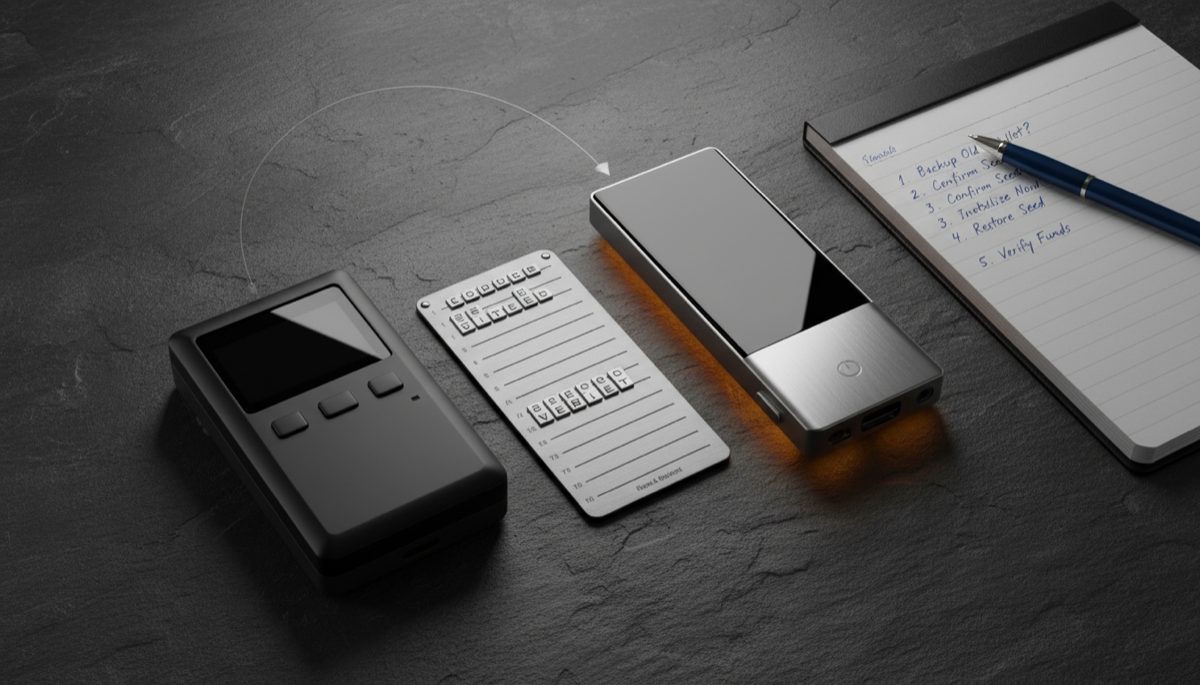
Regardless of the reason, the fundamental rule of hardware wallet migration is clear: never transfer your seed phrase from one device to another. We explore this in detail in our article on Bitcoin seed phrase management. The correct procedure is always to generate a fresh seed on the new device and send your Bitcoin through a standard on-chain transaction from the old wallet to the new one. This approach ensures that the private keys on your new device have been generated in a verified, secure environment and have never existed on any other hardware.
Understanding Seed Phrases and Key Derivation
Before diving into the migration process, it is important to understand what your seed phrase actually represents and why it should not be reused across devices. A BIP39 seed phrase — your 12 or 24 recovery words — is a human-readable encoding of a master entropy source from which all your private keys are mathematically derived.
The derivation process is hierarchical and deterministic: from the master seed, a series of child keys are generated according to standardized derivation paths (like m/84’/0’/0′ for native SegWit addresses). Our comprehensive guide on HD wallet key management covers this further. Each derivation path produces a complete set of addresses and their corresponding private keys. This architecture means your single seed phrase controls every address your wallet has ever generated.
BIP39 passphrases add another layer to this system. For a deeper look at this topic, see our guide on Bitcoin wallet passphrases. When you add a passphrase (sometimes called the “25th word”) to your seed phrase, the combination produces an entirely different master seed, which in turn generates a completely separate set of addresses and keys. This means that the same 24-word seed phrase with different passphrases controls different wallets with different balances — a powerful feature for security and plausible deniability.
Understanding this structure is critical for migration because it explains why you need to account for all derivation paths and passphrases when moving funds. If you have used a passphrase to create hidden wallets, those wallets exist only when the correct passphrase is applied to the seed — and you must remember to migrate funds from each passphrase-derived wallet separately.
Pre-Migration Checklist
Before beginning any migration, complete the following preparation steps to ensure a smooth and secure transition.
Verify your backup of the old wallet’s seed phrase. Even though you will not be importing this seed into the new device, you need a verified backup as a safety net in case anything goes wrong during migration. If you have not tested your backup recently, now is the time — import it into a software wallet in a secure, offline environment to confirm it generates the expected addresses.
Document all derivation paths and passphrases. Review your wallet configuration to identify every derivation path in use and every passphrase-protected wallet. Common derivation paths include m/44’/0’/0′ (legacy), m/49’/0’/0′ (nested SegWit), and m/84’/0’/0′ (native SegWit). If you have used your wallet with multiple software interfaces, different paths may have been used at different times.
Initialize your new hardware wallet with a fresh seed. Set up the new device following the manufacturer’s instructions. Generate a new seed phrase, record it on a metal backup, verify the backup through the device’s built-in verification feature, and set a strong PIN. If you plan to use a passphrase on the new device, configure it now and record it securely.
Verify the new wallet’s firmware. Before trusting your new device with any funds, confirm it is running verified, authentic firmware from the manufacturer. This is especially important if the device was purchased from a reseller rather than directly from the manufacturer.
Plan your transaction timing and fees. On-chain Bitcoin transactions require fees, and these fees vary based on network congestion. Check current fee rates and plan your migration for a period of low network activity if the fee savings are meaningful relative to the amount being transferred. For large amounts, the transaction fees are a small price to pay for proper security hygiene.
The Migration Process Step by Step
With your preparation complete, the actual migration follows a straightforward process.
Step 1: Generate receiving addresses on the new wallet. Connect your new hardware wallet to your preferred wallet software (Sparrow Wallet is recommended for its excellent hardware wallet support). Generate a new receiving address and verify it on the hardware wallet’s screen. The address shown on the device screen is the source of truth — if it does not match what the software displays, do not proceed.
Step 2: Start with a small test transaction. From your old wallet, send a small amount of Bitcoin — enough to cover future transaction fees — to the new wallet’s verified receiving address. Wait for the transaction to confirm on the blockchain (at least one confirmation, preferably three to six). Then verify that the balance appears correctly in your new wallet.
Step 3: Verify you can spend from the new wallet. This step is crucial and often skipped. Send a small portion of the test funds back to your old wallet or to another address you control. This confirms that your new device can successfully sign transactions and that the seed phrase backup is correct. If you cannot send from the new wallet, investigate before moving more funds.
Step 4: Transfer the remaining balance. Once you have confirmed that the new wallet can both receive and send, transfer the rest of your Bitcoin from the old wallet. If your old wallet has funds across multiple addresses, derivation paths, or passphrase-protected wallets, you will need to send separate transactions from each. Use your wallet software’s coin control features if available to ensure you are sending from all relevant addresses.
Step 5: Verify the final balances. After all transactions have confirmed, verify that the full expected balance appears in your new wallet and that the old wallet shows a zero balance across all derivation paths and passphrases.
Handling BIP39 Passphrases During Migration
If you use BIP39 passphrases on your old wallet, migration requires extra care. Each passphrase creates a separate wallet with its own balance, and you must migrate funds from each one individually. This topic is explored further in our post on Bitcoin wallet segregation.
Start by listing all passphrases you have used with the old device. For each passphrase, access the corresponding wallet on the old device, verify the balance, and send the funds to the new wallet. If you plan to use passphrases on the new device as well, you can send funds from each old passphrase wallet to a corresponding passphrase wallet on the new device — but remember that the underlying seed phrases are different, so the same passphrase will generate different addresses on the new device.
A common mistake during migration is forgetting about a passphrase-protected wallet. Because there is no way to enumerate all possible passphrases (any text string is a valid passphrase, and each generates a valid wallet), you must rely on your own records. This is why maintaining clear documentation of your wallet structure is so important from the beginning.
After migration, do not immediately destroy the old wallet or its seed phrase backup. Keep them accessible for a reasonable period — several weeks to a few months — in case you discover a passphrase-protected wallet or derivation path that you overlooked. Only after you are completely certain all funds have been transferred should you securely dispose of the old device and its backups.
Script Types and Address Compatibility
When migrating between hardware wallets, especially between devices from different manufacturers or different generations, be aware of Bitcoin address type compatibility. You can learn more about this in our resource on Bitcoin address types. Bitcoin has several address formats that represent different script types.
Legacy addresses (starting with 1) use Pay-to-Public-Key-Hash (P2PKH) scripts. Nested SegWit addresses (starting with 3) use Pay-to-Script-Hash wrapping a SegWit script (P2SH-P2WPKH). Native SegWit addresses (starting with bc1q) use Pay-to-Witness-Public-Key-Hash (P2WPKH). Taproot addresses (starting with bc1p) use Pay-to-Taproot (P2TR).
Your new device should support all these address types for receiving migrations from your old wallet. Native SegWit (bc1q) addresses offer the best combination of lower fees and broad compatibility and are the recommended default for new wallets. Taproot addresses offer additional privacy benefits but may not be supported by all wallet software and services yet.
If your old wallet used multiple address types — perhaps legacy addresses in its early days and SegWit addresses more recently — you will need to send transactions from each address type. Your wallet software should show balances broken down by address type, allowing you to verify that all funds have been accounted for.
Security Considerations After Migration
After completing your migration, several security steps finalize the transition. First, verify once more that the old wallet’s balance is zero across all address types and passphrases. Then consider what to do with the old device and its seed phrase backup.
The old device should be factory reset to clear all key material from its memory. If you plan to repurpose it — perhaps as a secondary signing device or for testing — a factory reset followed by fresh initialization is sufficient. If you plan to dispose of it, a factory reset followed by physical destruction of the device provides the highest assurance that its key material cannot be recovered.
The old seed phrase backup presents a different consideration. Even though no funds remain in the old wallet, the seed phrase could theoretically be used if someone later sends Bitcoin to one of the old addresses (a rare but possible scenario). Most users should securely destroy the old seed phrase backup after a reasonable waiting period to eliminate this remote risk. If you are particularly cautious, you can keep the backup in secure storage indefinitely as a safety measure.
Update your documentation and succession plans to reflect the new wallet configuration. If you have shared recovery instructions with family members or included hardware wallet details in a will or trust, these documents need to be updated with the new device information, seed phrase backup location, and any new passphrases.
Common Migration Mistakes to Avoid
The most dangerous mistake in hardware wallet migration is importing the old seed phrase into the new device instead of generating a fresh one. This defeats the entire purpose of migration by ensuring that the new device’s keys are only as secure as the least secure environment the seed phrase has ever touched. Always generate fresh entropy on the new device.
Rushing the process is another common error. Skipping the test transaction and spend verification steps may save a few minutes but introduces the risk of sending your entire balance to an address you cannot spend from. The small transaction fees for testing are negligible compared to the cost of a mistake.
Failing to account for all funds is particularly risky for users with complex wallet configurations. If you have used multiple passphrases, derivation paths, or address types over the life of your wallet, ensure every source of funds is included in your migration plan. Use your wallet software’s discovery features to scan for balances across all common derivation paths.
Finally, do not rush to destroy old backups. Keep them accessible until you are absolutely certain the migration is complete. The peace of mind of having a fallback far outweighs the minor inconvenience of maintaining the old backup for a few extra weeks.
Step-by-Step Guide: Migrating Bitcoin to a New Hardware Wallet
This streamlined guide covers the practical process of moving your Bitcoin from an old hardware wallet to a new one safely.
Step 1: Set up the new hardware wallet with a fresh seed. Unbox the new device, verify its packaging and tamper-evident seals, and follow the manufacturer’s initialization process. Generate a new seed phrase on the device — do not import the old seed. Stamp the new seed onto a metal backup and verify it against the device’s displayed words. Set a strong PIN.
Step 2: Connect the new wallet to Sparrow Wallet and generate a receive address. Open Sparrow Wallet, connect the new hardware wallet, and create a new wallet file. Navigate to the Receive tab and generate the first address. Verify this address on the hardware wallet’s physical display — the address shown on Sparrow must exactly match the address shown on the device. Copy this verified address.
Step 3: Send a small test transaction from the old wallet. Connect your old hardware wallet to its wallet software. Send a small amount — 50,000 to 100,000 satoshis — to the verified receive address on the new wallet. Wait for at least one blockchain confirmation. Verify the balance appears in the new wallet on Sparrow.
Step 4: Spend from the new wallet to verify signing. This is the step most people skip, and it is critical. Send a small portion of the test amount back to your old wallet or to another address you control. This proves that the new device can sign transactions and that your seed phrase backup is correct. If signing fails, investigate before transferring more funds.
Step 5: Transfer the full balance. Once the test cycle (receive, verify, send) completes successfully, transfer the remaining balance from the old wallet to the new one. If your old wallet has multiple address types or passphrase-protected wallets, send separate transactions from each. Use Sparrow’s coin selection to verify you are not leaving any UTXOs behind.
Step 6: Verify zero balance on the old wallet. After all transactions confirm, check that the old wallet shows zero balance across all derivation paths (legacy, nested SegWit, native SegWit, Taproot) and all passphrase wallets. Use Sparrow’s discovery feature to scan all standard derivation paths if you are uncertain which ones were used.
Step 7: Secure the new backup and decommission the old device. Store the new wallet’s seed backup in your planned secure locations. Factory reset the old hardware wallet. Keep the old seed phrase backup accessible for 2-3 months in case you discover overlooked funds, then securely destroy it.
Warning: The most critical mistake in migration is importing the old seed phrase into the new device instead of generating a fresh one. This defeats the entire purpose of migration — you want new entropy generated in a verified secure environment. Even if the old device was never compromised, generating a fresh seed ensures the new wallet starts with maximum security.
Common Mistakes to Avoid
Importing the old seed into the new device. This is not a migration — it is duplication. The new device’s keys are only as secure as the least secure environment the seed has ever touched. If the old device had compromised firmware, the seed is compromised regardless of which device holds it. Always generate fresh entropy on the new device.
Skipping the test spend verification. Receiving Bitcoin at an address and being able to spend from that address are two different things. Hardware wallet bugs, incorrect derivation paths, or configuration errors can create addresses that accept funds but cannot spend them. A 50,000 sat test transaction is cheap insurance against losing your entire balance.
Forgetting about passphrase-protected wallets. If you used BIP39 passphrases on the old device, each passphrase creates a separate wallet with its own balance. The base wallet (no passphrase) might show zero balance while significant funds remain in passphrase wallets. Check every passphrase you have ever used before considering the migration complete.
Destroying old backups too quickly. Users sometimes find funds months later in a derivation path or passphrase wallet they forgot about. Keep the old seed phrase backup secure for at least 2-3 months after migration. Only destroy it after you are certain all funds have been moved.
Frequently Asked Questions
Why can’t I just import my old seed phrase into the new device?
You technically can, but security experts strongly advise against it. Importing the old seed means the new device inherits any compromise that may have affected the old device. If the old device’s firmware was tampered with (like a Dark Skippy attack), the seed itself is compromised — moving it to a new device does not fix that. A fresh seed generated on verified firmware starts with a clean security baseline.
How much do migration transactions cost in fees?
The fee depends on how many UTXOs (unspent transaction outputs) your old wallet holds and current network fee rates. A wallet with a single UTXO might cost 1,000-5,000 sats to migrate at medium priority. A wallet with dozens of small UTXOs could cost 10,000-50,000+ sats because each UTXO adds to the transaction size. Check current fee rates on mempool.space and consider consolidating UTXOs during low-fee periods (weekends, early mornings UTC).
Can I migrate from a single-sig wallet to a multisig wallet?
Yes. The process is the same conceptually — you send Bitcoin from the old single-sig wallet to a new multisig wallet address. Set up the multisig wallet first (with verified address matching across all devices), complete the test cycle, then transfer the full balance. This is a common upgrade path for users with growing holdings who want stronger security.
What if my old hardware wallet is broken and I cannot sign transactions?
If the device is non-functional, you need to recover the old wallet using the seed phrase backup. Import the old seed into a compatible software wallet (Sparrow, Electrum) running on a secure, air-gapped computer. Sign the migration transactions from the software wallet and broadcast them. After all funds are moved to the new hardware wallet, securely wipe the computer used for recovery.
For a broader perspective, explore our Bitcoin seed phrase security guide.
Related Resources
- Hardware Wallet Firmware Updates: Security Best Practices
- Dark Skippy Attack: Is Your Hardware Wallet Safe?
- Seed Phrase Storage Best Practices
- Bitcoin Address Types and Hardware Wallet Compatibility
- Hardware Wallet Multisig Setup Guide
Dedicated signing devices strengthen your setup — explore Hardware Wallet Buying Guide 2026.
Hardware wallet users should also read Hardware Wallet Side-Channel Attack Risks.