What Is Nunchuk?
Nunchuk is a bitcoin wallet application built specifically for multisig. Available on iOS, Android, Windows, macOS, and Linux, it serves as a multisig coordinator that works with most major hardware wallets and provides a collaborative signing experience that few competitors match. Where other wallets bolt on multisig as an afterthought, Nunchuk treats it as the primary use case.
The app launched in 2021 and has gained steady adoption among bitcoiners looking for a mobile-friendly multisig solution. This review covers Nunchuk’s feature set, the multisig workflow, collaborative custody options, Tap Signer support, and an honest assessment of where it excels and where it falls short.
Core Features
Native Multisig First
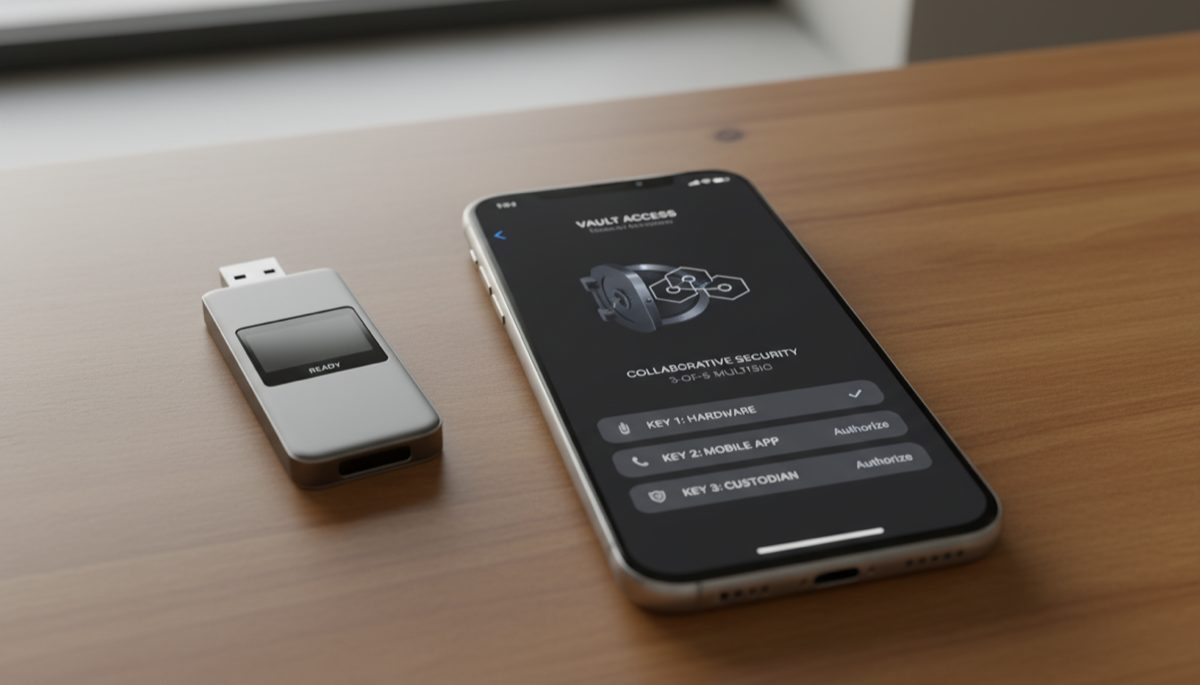
Unlike wallets that support multisig through hidden menus or complex import processes, Nunchuk’s entire interface is designed around managing multiple keys. Creating a 2-of-3 or 3-of-5 wallet takes a few taps. The app guides you through adding each cosigner, whether it is a hardware wallet, another Nunchuk installation on a different device, or a key held by a trusted contact.
Nunchuk supports standard multisig configurations including 2-of-3, 2-of-4, and 3-of-5. It uses descriptor-based wallets, which means wallet configuration exports are portable to other software like Sparrow, Electrum, or Bitcoin Core.
Cross-Platform Sync
Nunchuk syncs wallet state across your devices using end-to-end encrypted sync (or via a self-hosted relay for maximum privacy). Create a multisig wallet on your desktop, monitor balances on your phone, and sign transactions from whichever device has access to the required hardware wallet. This solves a pain point of desktop-only coordinators where you cannot check your wallet balance without being at your computer.
Air-Gapped Communication
For hardware wallets that do not connect via USB, Nunchuk supports QR code and NFC communication. You can create a transaction on the app, display it as a QR code, scan it with a Coldcard QR or Passport, sign it on the hardware device, and scan the signed result back into Nunchuk. The full round trip happens without any wired connection.
Key Management Dashboard
Each key in your multisig setup gets its own profile in the app. You can see the master fingerprint, the derivation path, the device type, and whether the key has signed recent transactions. This visibility makes managing multiple wallets across multiple devices far less confusing than tracking everything manually.
Setting Up a Multisig Wallet in Nunchuk
Step 1: Add Your Keys
- Open Nunchuk and tap Keys at the bottom.
- Tap Add Key and choose the source:
- NFC — Tap a Tap Signer or SATSCARD to import the key.
- Air-gapped — Scan a QR code or import from file (Coldcard via microSD).
- Wired — Connect a Trezor or Ledger via USB (desktop only).
- Software key — Generate a hot key on the device (less secure, useful for testing).
- Repeat for each hardware wallet in your setup. A 2-of-3 requires three keys.
Step 2: Create the Wallet
- Go to Wallets and tap Create New Wallet.
- Select the wallet type: Standard Wallet (single-sig) or Multi-sig Wallet.
- Choose the quorum: 2-of-3, 3-of-5, etc.
- Assign keys to the wallet from your key list.
- Name the wallet and confirm.
The wallet generates its first receiving addresses immediately. As with any multisig setup, verify the first address on each hardware device before depositing funds. This step prevents a compromised app from displaying an attacker’s address.
Step 3: Receive and Send
Receiving works identically to any bitcoin wallet — share the address, wait for confirmation. Sending is where multisig gets interesting.
- Create the transaction in Nunchuk (recipient, amount, fee).
- The app generates a PSBT (Partially Signed Bitcoin Transaction).
- Sign with the first key — tap the key, connect via NFC/QR/USB, confirm on the hardware device.
- Sign with the second key — repeat with a different device.
- With the threshold met, Nunchuk broadcasts the transaction.
The PSBT standard means you can also export the unsigned transaction to another coordinator (like Sparrow Wallet) for signing if needed.
Collaborative Custody With Nunchuk
Nunchuk’s standout feature is collaborative multisig — sharing a wallet with other people, each holding their own key. This works for:
- Couples or families — Joint custody of shared savings where both parties must agree on spending.
- Business treasury — A company’s bitcoin requires multiple authorized signers.
- Inheritance setups — A trusted family member or attorney holds one key for estate planning.
How Collaborative Custody Works
- One person creates the multisig wallet in Nunchuk.
- They invite cosigners via encrypted link or QR code.
- Each cosigner imports their own key into their Nunchuk installation.
- When a transaction is created, all cosigners see a notification.
- Each signer approves (or rejects) and signs with their key from their own device.
The signature collection happens asynchronously — cosigners do not need to be online at the same time. One person can create and sign a transaction in the morning, and the second cosigner can add their signature hours later from a different timezone.
Nunchuk Premium Tiers
Nunchuk offers three tiers:
- Free (Iron Hand) — Full multisig functionality, self-custody only. No key held by Nunchuk.
- Honey Badger — Adds assisted key recovery and one Nunchuk-held emergency key. Monthly subscription.
- Byzantine — Full concierge service with inheritance planning, dedicated support, and platform-level insurance on Nunchuk’s key infrastructure. Higher monthly fee.
The free tier is fully functional for technical users who want pure self-custody. The paid tiers add convenience and backup options — Nunchuk holds one key (never enough to spend alone), which lets you recover if you lose one of your own keys.
Tap Signer and SATSCARD Support
Nunchuk was among the first wallets to integrate Coinkite’s Tap Signer — a credit-card-sized NFC signing device. At $30–$40, the Tap Signer is far cheaper than a traditional hardware wallet, making multisig more accessible.
How Tap Signer Works With Nunchuk
- Initialize the Tap Signer by tapping it to your phone in the Nunchuk app.
- The Tap Signer generates a private key internally and exports only the XPUB to Nunchuk.
- Add the Tap Signer as one of the keys in your multisig wallet.
- When signing transactions, tap the Tap Signer to your phone’s NFC reader.
- The Tap Signer signs the transaction internally and returns the signature via NFC.
The Tap Signer has no screen, which means it cannot independently display transaction details for verification. This is its primary security limitation — you are trusting the Nunchuk app to show you the correct transaction. For this reason, using a Tap Signer as one key in a multisig (alongside screened hardware wallets like Coldcard or Passport for the other keys) is a reasonable trade-off. Using only Tap Signers for all keys in a multisig reduces your security guarantees.
SATSCARD support is also integrated. SATSCARDs are single-use NFC cards for gifting bitcoin — you load them with sats and hand them to someone, who unseals the card in Nunchuk to claim the funds.
Privacy Considerations
Nunchuk connects to Bitcoin nodes to fetch balance and transaction data. By default, it uses Nunchuk’s servers, which means they can see your addresses and balances. For users who prioritize privacy, Nunchuk supports connecting to your own Electrum server. This routes all queries through your personal infrastructure, preventing Nunchuk from correlating your activity.
The encrypted sync service transmits wallet metadata (names, labels, transaction notes) through Nunchuk’s servers, but with end-to-end encryption. Nunchuk states they cannot read this data. For maximum privacy, you can disable cloud sync entirely and keep wallet data only on individual devices — at the cost of manual data management across platforms.
Pros and Cons
Strengths
- Best mobile multisig experience. No other wallet makes creating, managing, and signing multisig transactions as smooth on a phone.
- Collaborative custody done right. Async signing, notifications, and shared wallet visibility make joint custody practical.
- Broad hardware wallet support. Works with Coldcard, Trezor, Ledger, Passport, Jade, BitBox02, Keystone, and Tap Signer.
- Descriptor-based wallets. Configuration exports are portable. You are not locked into Nunchuk — you can reconstruct your wallet in any descriptor-compatible software.
- Free tier is genuinely useful. The Iron Hand tier provides full multisig without paying a subscription.
- NFC signing. Tap Signer integration makes signing fast and cable-free.
Weaknesses
- No coin control in the mobile app. The desktop version offers some UTXO management, but the mobile app selects inputs automatically. For advanced UTXO management, Sparrow remains superior.
- Server dependency by default. Without configuring your own Electrum server, Nunchuk’s infrastructure sees your addresses.
- Tap Signer’s no-screen limitation. You cannot verify transaction details on the Tap Signer itself, which requires trusting the software.
- Premium features require subscription. Emergency key recovery and inheritance planning are behind paywalls.
- Closed-source server components. While the client apps are open source, the sync relay and backend infrastructure are proprietary.
Nunchuk vs Sparrow vs Casa
| Feature | Nunchuk | Sparrow | Casa |
|---|---|---|---|
| Mobile app | Yes (iOS + Android) | No (desktop only) | Yes (iOS + Android) |
| Collaborative signing | Built-in | Manual PSBT exchange | Built-in |
| Own node support | Yes (Electrum server) | Yes (Bitcoin Core / Electrum) | No |
| Coin control | Limited (desktop) | Full | No |
| Open source | Client apps: yes | Fully | No |
| Free tier | Yes | Yes (fully free) | No |
| Tap Signer support | Yes | No | No |
| Inheritance planning | Premium tier | Manual | Premium tier |
Security Architecture
Nunchuk’s security model centers on the principle that the app never holds your private keys. All signing operations happen on your hardware wallets or Tap Signer — the app only constructs transactions, collects signatures, and broadcasts the final result. Even if Nunchuk’s servers were fully compromised, an attacker could not spend your bitcoin because they never have access to your private keys.
The app stores wallet configuration data (XPUBs, derivation paths, transaction labels) either locally on your device or in Nunchuk’s encrypted cloud. This data allows the app to generate addresses and display balances but is insufficient to sign transactions. The encryption uses a key derived from your account credentials, so even Nunchuk’s infrastructure operators cannot decrypt your wallet metadata.
For the premium tiers where Nunchuk holds an emergency key, the key is stored in hardware security modules (HSMs) with strict access controls. Co-signing with this emergency key requires identity verification through a multi-step process. Nunchuk publishes audit reports detailing their key management procedures for enterprise and Byzantine tier users.
Verifying Receive Addresses
As with any multisig coordinator, the most critical security practice is verifying receiving addresses on your hardware wallet screens before depositing funds. Nunchuk supports address verification for hardware wallets that have registered the multisig configuration. After registering, navigate to the address verification feature on your hardware device and confirm the address matches what Nunchuk displays. If they diverge, the app may be compromised — do not deposit funds until resolved. This principle applies to all coordinators, not just Nunchuk, and is covered in our Bitcoin security architecture guide.
Who Should Use Nunchuk?
Nunchuk fits best for users who want multisig on mobile without sacrificing security fundamentals. It is particularly strong for:
- Couples or families managing shared bitcoin custody.
- Users who own a Tap Signer and want a wallet that supports it natively.
- Anyone migrating from single-sig to multisig and wanting a guided process.
- Bitcoiners who already use Sparrow at home but want mobile monitoring and signing capability.
If you prioritize coin control, advanced transaction building, or fully open-source infrastructure, Sparrow Wallet remains the better choice for your primary coordinator. The two tools complement each other well — use Sparrow for complex operations and Nunchuk for mobile access and collaborative signing.
Getting Started With Nunchuk
The onboarding process is straightforward:
- Download the app from the App Store (iOS), Google Play (Android), or the desktop releases page. Verify the download source — only use official distribution channels.
- Create an account or use guest mode. An account enables cross-device sync. Guest mode keeps everything local.
- Add your first key. If you have a hardware wallet, add it immediately. If testing, create a software key first.
- Create a wallet. Start with a single-sig wallet if you are new to Nunchuk, then graduate to multisig once you are comfortable with the interface.
- Connect to your own server (optional). Under Settings, configure your own Electrum server if you run a Bitcoin node. This significantly improves privacy.
The app includes contextual help throughout the setup process. Nunchuk’s documentation covers edge cases for specific hardware wallet combinations. If you encounter issues pairing a device, check that the hardware wallet’s firmware is up to date — older firmware versions sometimes have compatibility gaps with newer coordinator software.
For users coming from a single-sig wallet, the singlesig to multisig migration guide provides a structured approach to transitioning your funds safely into a new multisig wallet managed through Nunchuk or any other coordinator.
Multisig in Practice from the
Advanced Bitcoin Security & Privacy course.
Frequently Asked Questions
Is Nunchuk open source?
The client applications (mobile and desktop) are open source and available on GitHub. The backend sync service and infrastructure are proprietary. This means you can audit the code that runs on your device, but you are trusting Nunchuk’s servers for the sync layer.
Can I use Nunchuk without creating an account?
Yes. You can use Nunchuk in guest mode without an email account. This disables cross-device sync but preserves full wallet functionality. For privacy-conscious users, guest mode with your own Electrum server is the recommended configuration.
What happens if Nunchuk the company shuts down?
Your bitcoin remains accessible. The wallet uses standard Bitcoin descriptors, so you can import your wallet configuration into Sparrow, Electrum, or Bitcoin Core. Your hardware wallets and seed phrases are independent of Nunchuk. The only thing you lose is the convenience of Nunchuk’s sync and collaboration features.
Does Nunchuk support Taproot?
Taproot single-sig is supported. Taproot multisig (MuSig2) is not yet available but is on the development roadmap. Current multisig wallets use P2WSH scripts. When Taproot multisig matures, it will offer significant fee savings because multisig transactions will look identical to single-sig on-chain.
Can I recover a Nunchuk multisig wallet without the app?
Yes. Export the wallet descriptor from Nunchuk (Settings → Wallet Configuration) and import it into any descriptor-compatible wallet software. You also need your hardware wallets (or their seed phrase backups) to sign transactions. The descriptor contains only public keys and is safe to store in multiple locations.
How does Nunchuk handle transaction fees?
Nunchuk provides fee estimation based on current mempool conditions. You can choose between priority levels (high, medium, low) or set a custom fee rate in sats/vByte. For multisig transactions, the app correctly accounts for the larger transaction size due to multiple signatures. The fee estimate shown before signing reflects the actual cost of the final broadcast transaction.
Can I use Nunchuk alongside Sparrow for the same wallet?
Yes, and this is a common setup. Export the wallet descriptor from one coordinator and import it into the other. Both will show the same addresses, balances, and transaction history. You can monitor on mobile via Nunchuk and perform complex operations (coin control, batch sends) on desktop via Sparrow. The wallet descriptor format is standardized, so there is no lock-in to either platform. Just ensure both coordinators are connected to the same Bitcoin network data source — ideally your own full node — to prevent discrepancies in balance or transaction visibility.
For a broader perspective, explore our hardware wallet buying guide guide.
{“@context”: “https://schema.org”, “@type”: “FAQPage”, “mainEntity”: [{“@type”: “Question”, “name”: “Is Nunchuk open source?”, “acceptedAnswer”: {“@type”: “Answer”, “text”: “The client applications (mobile and desktop) are open source and available on GitHub. The backend sync service and infrastructure are proprietary. This means you can audit the code that runs on your device, but you are trusting Nunchuk’s servers for the sync layer.”}}, {“@type”: “Question”, “name”: “Can I use Nunchuk without creating an account?”, “acceptedAnswer”: {“@type”: “Answer”, “text”: “Yes. You can use Nunchuk in guest mode without an email account. This disables cross-device sync but preserves full wallet functionality. For privacy-conscious users, guest mode with your own Electrum server is the recommended configuration.”}}, {“@type”: “Question”, “name”: “What happens if Nunchuk the company shuts down?”, “acceptedAnswer”: {“@type”: “Answer”, “text”: “Your bitcoin remains accessible. The wallet uses standard Bitcoin descriptors, so you can import your wallet configuration into Sparrow, Electrum, or Bitcoin Core. Your hardware wallets and seed phrases are independent of Nunchuk. The only thing you lose is the convenience of Nunchuk’s sync and collaboration features.”}}, {“@type”: “Question”, “name”: “Does Nunchuk support Taproot?”, “acceptedAnswer”: {“@type”: “Answer”, “text”: “Taproot single-sig is supported. Taproot multisig (MuSig2) is not yet available but is on the development roadmap. Current multisig wallets use P2WSH scripts. When Taproot multisig matures, it will offer significant fee savings because multisig transactions will look identical to single-sig on-chain.”}}, {“@type”: “Question”, “name”: “Can I recover a Nunchuk multisig wallet without the app?”, “acceptedAnswer”: {“@type”: “Answer”, “text”: “Yes. Export the wallet descriptor from Nunchuk (Settings → Wallet Configuration) and import it into any descriptor-compatible wallet software. You also need your hardware wallets (or their seed phrase backups) to sign transactions. The descriptor contains only public keys and is safe to store in multiple locations.”}}, {“@type”: “Question”, “name”: “How does Nunchuk handle transaction fees?”, “acceptedAnswer”: {“@type”: “Answer”, “text”: “Nunchuk provides fee estimation based on current mempool conditions. You can choose between priority levels (high, medium, low) or set a custom fee rate in sats/vByte. For multisig transactions, the app correctly accounts for the larger transaction size due to multiple signatures. The fee estimate shown before signing reflects the actual cost of the final broadcast transaction.”}}, {“@type”: “Question”, “name”: “Can I use Nunchuk alongside Sparrow for the same wallet?”, “acceptedAnswer”: {“@type”: “Answer”, “text”: “Yes, and this is a common setup. Export the wallet descriptor from one coordinator and import it into the other. Both will show the same addresses, balances, and transaction history. You can monitor on mobile via Nunchuk and perform complex operations (coin control, batch sends) on desktop via Sparrow. The wallet descriptor format is standardized, so there is no lock-in to either platform. Just ensure both coordinators are connected to the same Bitcoin network data source — ideally your own f…”}}]}