Keystone 3 Pro Wallet Review: Air-Gapped Multi-Chain Security with a Touchscreen
The hardware wallet market has historically forced a choice: buy a Bitcoin-only device with strong security, or buy a multi-chain device with weaker isolation. Keystone has spent the last several years trying to prove that tradeoff is a false dichotomy. The Keystone 3 Pro, the company’s current flagship, supports over 5,500 cryptocurrencies while maintaining a fully air-gapped architecture with no USB data transfer, no Bluetooth, and no WiFi. It adds a 4-inch touchscreen, fingerprint authentication, and triple secure element chips to the mix. This review examines whether Keystone delivers on that ambitious promise.
Keystone (formerly Cobo Vault) was founded in 2018 and operates out of the Asia-Pacific region. The company has gone through a rebrand and multiple hardware generations, each one pushing toward better air-gapped UX for multi-chain users. If you are evaluating this device alongside Bitcoin-only alternatives, our hardware wallet buying guide provides a structured comparison framework.
Product Specifications
| Feature | Specification |
|---|---|
| Price | ~$149 |
| Manufacturer | Keystone (Asia-Pacific, founded 2018) |
| Coins Supported | 5,500+ cryptocurrencies |
| Connectivity | Air-gapped (QR codes only), USB-C for charging |
| Secure Element | 3 independent secure element chips (EAL 5+) |
| Screen | 4-inch IPS touchscreen |
| Battery | Removable AAA batteries (or rechargeable option) |
| Biometrics | Fingerprint sensor |
| Open Source | Firmware is open source |
Design and Build Quality
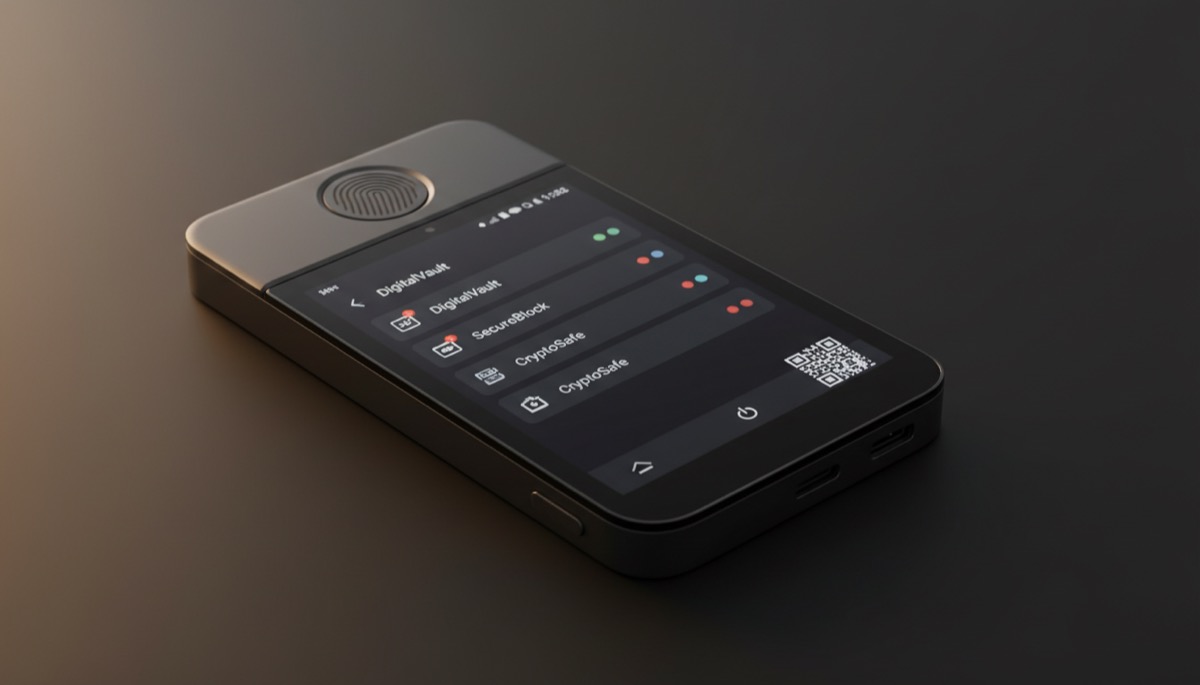
The Keystone 3 Pro is the largest hardware wallet you can buy from a major manufacturer. The 4-inch touchscreen dominates the front of the device, giving it the footprint of a small smartphone rather than the key-fob size of most competitors. This is a deliberate design decision: Keystone prioritizes screen real estate for verifying transaction details, displaying QR codes at scannable sizes, and providing a touch-based UI that feels familiar to smartphone users.
The body is constructed with a combination of materials designed to feel premium without reaching Passport-level pricing. The fingerprint sensor sits below the screen and integrates into the authentication flow. Build quality is solid — the device does not flex or creak, and the touchscreen is responsive with minimal lag.
One distinctive choice is the battery system. The Keystone 3 Pro uses removable AAA batteries rather than an internal lithium cell. This has practical advantages for long-term cold storage: AAA batteries are available everywhere, they do not degrade the same way lithium cells do when stored for years, and replacing them requires no tools or disassembly. You can also use rechargeable AAAs and top them up with an external charger. The USB-C port is wired for charging only when used with rechargeable batteries — no data transfer occurs over the cable.
The camera module on the back handles QR code scanning. It is the sole input channel for transaction data, and its quality matters. In testing, the Keystone’s camera reads QR codes reliably in normal lighting conditions, though very small or low-contrast codes can require a couple of attempts.
Setup Process
Initial setup happens entirely on the device’s touchscreen. You power on, select your language, create a password, and enroll your fingerprint. The device then generates a seed phrase, which you write down and verify by tapping the words in the correct order on screen.
The touchscreen makes this process significantly more intuitive than button-and-scroll interfaces found on smaller devices. Typing passwords, entering seed words, and navigating menus all benefit from the larger display. First-time hardware wallet users will find the setup experience familiar — it feels closer to setting up a new phone than configuring a security device.
The Keystone supports standard BIP39 seed phrases (12, 18, or 24 words) and also supports Shamir Secret Sharing through SLIP39, which we will cover in detail below. You can import an existing seed by typing it in on the touchscreen keyboard or set up the device with a new seed generated from its hardware random number generator.
Passphrases (the optional “25th word”) are supported for users who want to derive hidden wallets from the same seed. For a detailed explanation of how passphrases add security and what risks they introduce, our guide on wallet security passphrases and recovery best practices covers the topic thoroughly.
Security Features
The Keystone 3 Pro stacks multiple security mechanisms that are worth examining individually.
Triple Secure Element Architecture
The device contains three independent secure element chips rated at EAL 5+ (Common Criteria evaluation level). This is unusual — most hardware wallets use a single secure element or none at all. The three chips provide redundancy and cross-verification: cryptographic operations are distributed across the elements, and the device checks for consistency between them. If one chip is compromised or returns unexpected results, the discrepancy is flagged. This architecture raises the bar for physical extraction attacks significantly, since an attacker would need to compromise multiple independent secure elements simultaneously.
Anti-Tamper Mechanisms
The Keystone includes PCI-grade anti-tampering features. If the device detects physical intrusion — attempts to open the case, probe the circuit board, or tamper with the secure elements — it triggers a self-destruct mechanism that wipes all stored key material. The device performs a self-check at every boot to verify that no tampering has occurred since last use. This level of physical security is typically found in payment terminals and banking hardware, not consumer electronics. Our analysis of side-channel and physical attack risks provides broader context on why these protections matter.
Fingerprint Authentication
The integrated fingerprint sensor adds biometric authentication to the standard password protection. You can enroll multiple fingerprints during setup. Fingerprint verification is required for transaction signing, which means a thief who knows your password but does not have your finger (or a convincing spoof) cannot authorize transfers. Biometrics are not a replacement for passwords — they are an additional factor. The fingerprint data is stored and processed locally on the secure element and never leaves the device.
Air-Gapped Design
Like the Passport and Coldcard, the Keystone has no Bluetooth, no WiFi, and no NFC. The USB-C port carries power only. All data exchange happens through QR codes scanned by the built-in camera and displayed on the touchscreen. This eliminates remote attack vectors associated with wireless protocols and USB data stacks. The air-gapped boundary is maintained throughout the device’s operation, including firmware updates, which are loaded via QR code or microSD card.
For users managing both hot and cold wallets, our architecture guide on balancing cold storage and hot wallet risk management explains how an air-gapped signing device fits into a broader security strategy.
Shamir Secret Sharing (SLIP39)
One of the Keystone’s more advanced features is support for Shamir Secret Sharing through the SLIP39 standard. Instead of backing up a single seed phrase that represents a single point of failure, SLIP39 lets you split your seed into multiple shares with a configurable threshold.
For example, you could create a 3-of-5 Shamir backup: five separate share cards, any three of which are sufficient to reconstruct your seed. You distribute these shares to different physical locations — a home safe, a bank vault, a trusted family member, a secondary property, and a sealed envelope with your attorney. Losing any two shares does not compromise your funds, and no single share reveals anything about your keys.
This is a significant upgrade over standard BIP39 backups, where a single seed phrase must be stored in one piece, creating an all-or-nothing risk profile. Shamir backups add redundancy without sacrificing security. However, SLIP39 is not universally supported — you need a wallet or device that understands the format to reconstruct the seed. The Keystone handles both creation and reconstruction of Shamir shares natively.
For a broader discussion of seed phrase backup strategies and their risk profiles, our resource on seed phrase storage best practices and risk mitigation is a useful companion read.
Software Ecosystem
The Keystone’s multi-chain support means it integrates with a wide range of wallet software across different blockchain ecosystems:
Bitcoin Wallets
- Sparrow Wallet — Full integration via QR codes for air-gapped PSBT signing. This is the recommended pairing for Bitcoin-focused users.
- Electrum — Desktop wallet support through standard PSBT workflows.
- Blue Wallet — Mobile PSBT signing via QR codes for watch-only wallet setups.
- Nunchuk — Multisig coordination and collaborative custody with Keystone as a signing device.
- Specter Desktop — Bitcoin Core integration for node operators running multisig.
Ethereum and Multi-Chain Wallets
- MetaMask — Direct QR-based integration for signing Ethereum transactions air-gapped. This is a standout feature — most MetaMask users rely on USB-connected Ledger or Trezor devices. The Keystone lets you use MetaMask without ever connecting the signing device to your computer.
- Rabby Wallet — Browser extension wallet with QR-based Keystone support for DeFi interactions.
- Keplr — Cosmos ecosystem wallet integration for staking and governance transactions.
The MetaMask integration is particularly notable. DeFi users who interact with smart contracts, decentralized exchanges, and lending protocols face significant signing risks — a compromised browser extension or phishing site can craft malicious transactions that look legitimate. By moving transaction signing to an air-gapped device where every detail is displayed on a trusted screen, the Keystone adds a meaningful layer of protection to DeFi workflows.
Multi-Chain Support vs Bitcoin-Only Mode
The Keystone supports over 5,500 assets across Bitcoin, Ethereum, Solana, Cosmos, and many other chains. For users who hold a diversified cryptocurrency portfolio and interact with DeFi protocols on multiple chains, this broad compatibility is the device’s primary selling point.
However, multi-chain support comes with inherent tradeoffs. Every additional blockchain integration means additional firmware code, additional signing logic, and additional potential attack surface. Bitcoin-only devices like the Passport and Coldcard deliberately restrict their scope to minimize this risk — fewer code paths mean fewer potential vulnerabilities.
Keystone addresses this partially with a Bitcoin-only firmware option. You can flash the device with firmware that strips out all non-Bitcoin functionality, reducing the codebase to a smaller, more auditable scope. This is a thoughtful middle ground: buy one device, use it in multi-chain mode while you need it, and switch to Bitcoin-only firmware if your holdings consolidate over time. The evolution of how Bitcoin custody solutions have balanced feature scope with security is explored in our article on Bitcoin self-custody, security, redundancy, and usability.
Air-Gapped Workflow: How QR Code Signing Works
Since the Keystone has no data connection to any other device, every transaction follows a QR-code-based workflow. Here is the step-by-step process:
- Construct the transaction — On your companion wallet (Sparrow, MetaMask, etc.), you create a transaction specifying the recipient, amount, and fee. The wallet generates an unsigned transaction.
- Display the unsigned transaction — The companion wallet displays the unsigned transaction as a QR code (or animated sequence of QR codes for larger transactions) on your computer or phone screen.
- Scan with Keystone — Using the built-in camera, the Keystone scans the QR code and decodes the unsigned transaction data.
- Review on trusted screen — The 4-inch touchscreen displays the full transaction details: recipient address, amount, fee, and network. You verify that everything matches your intent.
- Authenticate and sign — You authenticate with your fingerprint and password. The Keystone signs the transaction using the private keys stored in the secure elements.
- Display the signed transaction — The Keystone displays the signed transaction as a QR code on its screen.
- Scan with companion wallet — Your companion wallet scans the signed QR code and broadcasts the transaction to the network.
At no point does any private key material leave the Keystone. The QR codes contain only transaction data and signatures — never seeds or private keys. The 4-inch screen is a genuine advantage here: QR codes are large, clear, and scan quickly. Smaller devices with sub-2-inch screens often need animated QR sequences that take longer to transfer.
Pros and Cons
Pros
- Fully air-gapped with no Bluetooth, WiFi, or USB data connectivity
- 4-inch touchscreen makes transaction verification and QR scanning fast and clear
- Triple secure element chips (EAL 5+) with redundancy and cross-verification
- Fingerprint authentication adds a biometric factor beyond passwords
- Supports 5,500+ cryptocurrencies with dedicated Bitcoin-only firmware option
- MetaMask integration allows air-gapped Ethereum transaction signing
- SLIP39 Shamir Secret Sharing for distributed seed backups
- Removable AAA batteries — no lithium cell degradation during long-term storage
- PCI-grade anti-tamper with self-destruct capability
- Open-source firmware for independent auditing
- Competitive pricing at $149
Cons
- Larger form factor is less portable than compact devices like the Jade or Ledger
- Multi-chain firmware increases code complexity and theoretical attack surface
- Hardware schematics are not fully open source (firmware is, hardware is not)
- Touchscreen interface may be less durable long-term than physical buttons
- Fingerprint sensor adds convenience but also adds a potential failure point
- Manufacturer based in Asia-Pacific — some users prefer US or European supply chains for trust reasons
- AAA batteries add bulk compared to slim rechargeable-only designs
- Fewer years of public security track record compared to Coldcard or Trezor
Who Should Buy the Keystone 3 Pro
The Keystone 3 Pro is built for multi-chain users who refuse to compromise on air-gapped security. If you hold Ethereum, participate in DeFi, manage assets across Cosmos or Solana, and want every transaction signed on a device that never touches a network, the Keystone is one of very few options that delivers this.
DeFi users will find the MetaMask and Rabby integrations particularly valuable. Signing a Uniswap trade or an Aave deposit on an air-gapped device with a 4-inch screen where you can actually read the contract interaction details is a meaningfully different security posture than plugging a Ledger into a USB port and clicking a tiny screen.
The Keystone also appeals to users who want SLIP39 Shamir backups. If you want to distribute your seed backup across multiple locations with a threshold recovery scheme, this is one of the few devices that handles it natively.
Bitcoin maximalists who do not hold other assets should look elsewhere. The Passport and Coldcard offer tighter codebases, stronger open-source credentials (including hardware), and security track records built specifically around Bitcoin. The Keystone’s Bitcoin-only firmware mode is a reasonable compromise, but the hardware itself is designed for multi-chain use, and that philosophy permeates the device. For institutional-scale Bitcoin custody considerations, our article on institutional custody and core Bitcoin principles discusses the relevant tradeoffs.
Comparison with Alternatives
Keystone 3 Pro vs Ledger Flex
The Ledger Flex is Keystone’s closest competitor in the large-touchscreen category. Both have E Ink or IPS displays large enough for comfortable interaction, and both support thousands of assets. The key difference is connectivity: the Ledger Flex uses Bluetooth and USB for data transfer, while the Keystone is fully air-gapped via QR codes. Ledger’s firmware is not open source (though they have moved toward opening parts of it), while Keystone’s firmware is open source. Ledger has a longer track record and broader brand recognition. The Keystone wins on air-gapped security and firmware transparency; the Ledger wins on ecosystem maturity and integration breadth.
Keystone 3 Pro vs Foundation Passport
These devices serve different audiences despite sharing the air-gapped philosophy. The Passport is Bitcoin-only with fully open-source hardware and firmware, aluminum construction, and a physical keypad. The Keystone supports thousands of assets, uses a touchscreen, includes fingerprint authentication, and costs $150 less. If you hold only Bitcoin, the Passport is the better choice. If you need multi-chain support with air-gapped security, the Keystone is the only serious option. For understanding why some security-focused users prefer to reduce their wallet’s scope to a single chain, our technical discussion of wallet architecture and security considerations provides relevant analysis.
Keystone 3 Pro vs Coldcard MK4
The Coldcard is a Bitcoin-only device with a small monochrome screen, a numeric keypad, and a deeply paranoid security model. It does not support any other cryptocurrency, does not have a touchscreen, and does not have a fingerprint reader. What it does have is years of security audits, a battle-tested codebase, and a reputation as the most security-hardened Bitcoin signing device available. Comparing these two devices only makes sense if you are deciding between a Bitcoin-only approach and a multi-chain approach. If you know you want Bitcoin only, the Coldcard or Passport are stronger choices. If you need multi-chain air-gapped security, the Keystone has no real competition from Coldcard.
Verdict
The Keystone 3 Pro occupies a unique position in the hardware wallet market. It is the only device that combines genuine air-gapped security (no Bluetooth, no WiFi, no USB data) with broad multi-chain support and a large, usable touchscreen. The triple secure element architecture, fingerprint authentication, and anti-tamper mechanisms are features typically reserved for higher price points or enterprise-grade equipment.
The tradeoffs are real: multi-chain firmware is inherently more complex and harder to audit than Bitcoin-only code, the hardware is not fully open source, and the manufacturer does not have the decades-long track record of companies like SatoshiLabs (Trezor) or the community credibility of Blockstream (Jade). But Keystone has been shipping hardware wallets since 2018, has accumulated a meaningful body of independent security reviews, and has demonstrated a commitment to open-source firmware and air-gapped design that is rare in the multi-chain segment.
For DeFi participants, multi-chain holders, and users who want the security benefits of air-gapped signing across ecosystems beyond Bitcoin, the Keystone 3 Pro is the strongest option available at any price. Pair it with Sparrow for Bitcoin, MetaMask for Ethereum, and you have a versatile security setup that keeps your keys permanently offline.
Rating: 8/10
Ledger vs Trezor: Best Hardware Wallet from the
Bitcoin Wallets & Self-Custody course.
Frequently Asked Questions
Can the Keystone 3 Pro be used in a Bitcoin multisig setup?
Yes. The Keystone supports standard PSBT (BIP174) workflows and exports xpubs via QR code. You can use it as one signing device in a multisig quorum managed by Sparrow, Specter, Nunchuk, or other coordinator software. It works alongside devices from other manufacturers — you could pair a Keystone with a Passport and a Coldcard in a 2-of-3 setup. The 4-inch screen makes reviewing multisig transaction details comfortable, and the QR-based workflow integrates smoothly with air-gapped PSBT coordinators. For guidance on setting up and managing multisig configurations, our guide on multi-signature wallet configurations and practical implementation covers the process in detail.
How does the self-destruct anti-tamper feature work, and can it be triggered accidentally?
The anti-tamper mechanism monitors for physical intrusion attempts — opening the device case, probing the circuit board, or tampering with the secure element chips. If triggered, the device wipes all stored key material from the secure elements, rendering the device empty. Normal use — drops, bumps, temperature changes, airport X-ray machines — will not trigger the mechanism. It requires the kind of deliberate physical probing associated with extraction attacks. Your funds are not at risk from the self-destruct because your seed phrase backup (written on paper or metal) remains valid and can be restored on any BIP39-compatible wallet. The anti-tamper feature protects against someone stealing your device and extracting keys, not against everyday wear and tear.
Is the Bitcoin-only firmware meaningfully more secure than the multi-chain firmware?
In principle, yes. The Bitcoin-only firmware strips out all non-Bitcoin signing logic, address derivation paths, and chain-specific code. This reduces the overall codebase, which reduces the potential attack surface — fewer lines of code mean fewer potential bugs or vulnerabilities. It also simplifies auditing, since reviewers only need to verify Bitcoin-related functionality. In practice, the multi-chain firmware has not had any public security incidents attributable to its broader scope, so the risk reduction is theoretical rather than demonstrated. If you hold only Bitcoin and want the tightest possible security posture, switching to Bitcoin-only firmware is a reasonable precaution. If you actively use multiple chains, the convenience of multi-chain firmware outweighs the marginal security benefit of the stripped-down version.
How does SLIP39 Shamir backup compare to a standard BIP39 seed phrase for security?
A standard BIP39 seed phrase is a single secret: whoever possesses it controls your funds. This creates a fundamental tension between security (hiding it well) and accessibility (being able to find it when needed). SLIP39 resolves this by splitting the seed into multiple shares with a threshold — for example, 3-of-5 means you need any three of five shares to reconstruct the seed. No individual share reveals anything about your keys. This allows you to distribute shares across multiple locations and trusted parties, surviving the loss or theft of up to two shares while maintaining security. The downside is complexity: you have more pieces to manage, more locations to maintain, and you need a SLIP39-compatible device or software to reconstruct the seed. BIP39 is simpler and more universally supported. SLIP39 is more resilient but requires more planning. For high-value holdings, the added resilience of Shamir backup is often worth the extra setup effort. Our comprehensive guide on seed phrase security discusses both approaches and helps you decide which fits your situation.
You may also find our Bitcoin multisig guide guide useful.
{“@context”: “https://schema.org”, “@type”: “FAQPage”, “mainEntity”: [{“@type”: “Question”, “name”: “Can the Keystone 3 Pro be used in a Bitcoin multisig setup?”, “acceptedAnswer”: {“@type”: “Answer”, “text”: “Yes. The Keystone supports standard PSBT (BIP174) workflows and exports xpubs via QR code. You can use it as one signing device in a multisig quorum managed by Sparrow, Specter, Nunchuk, or other coordinator software. It works alongside devices from other manufacturers — you could pair a Keystone with a Passport and a Coldcard in a 2-of-3 setup. The 4-inch screen makes reviewing multisig transaction details comfortable, and the QR-based workflow integrates smoothly with air-gapped PSBT coordi…”}}, {“@type”: “Question”, “name”: “How does the self-destruct anti-tamper feature work, and can it be triggered accidentally?”, “acceptedAnswer”: {“@type”: “Answer”, “text”: “The anti-tamper mechanism monitors for physical intrusion attempts — opening the device case, probing the circuit board, or tampering with the secure element chips. If triggered, the device wipes all stored key material from the secure elements, rendering the device empty. Normal use — drops, bumps, temperature changes, airport X-ray machines — will not trigger the mechanism. It requires the kind of deliberate physical probing associated with extraction attacks. Your funds are not at risk fro…”}}, {“@type”: “Question”, “name”: “Is the Bitcoin-only firmware meaningfully more secure than the multi-chain firmware?”, “acceptedAnswer”: {“@type”: “Answer”, “text”: “In principle, yes. The Bitcoin-only firmware strips out all non-Bitcoin signing logic, address derivation paths, and chain-specific code. This reduces the overall codebase, which reduces the potential attack surface — fewer lines of code mean fewer potential bugs or vulnerabilities. It also simplifies auditing, since reviewers only need to verify Bitcoin-related functionality. In practice, the multi-chain firmware has not had any public security incidents attributable to its broader scope, so…”}}, {“@type”: “Question”, “name”: “How does SLIP39 Shamir backup compare to a standard BIP39 seed phrase for security?”, “acceptedAnswer”: {“@type”: “Answer”, “text”: “A standard BIP39 seed phrase is a single secret: whoever possesses it controls your funds. This creates a fundamental tension between security (hiding it well) and accessibility (being able to find it when needed). SLIP39 resolves this by splitting the seed into multiple shares with a threshold — for example, 3-of-5 means you need any three of five shares to reconstruct the seed. No individual share reveals anything about your keys. This allows you to distribute shares across multiple locatio…”}}]}