Jade Hardware Wallet Review: Blockstream’s Budget-Friendly Bitcoin Signing Device
Blockstream is one of the most well-known companies in the Bitcoin infrastructure space. They build the Liquid sidechain, contribute heavily to Bitcoin Core development, operate mining facilities, and run satellite nodes that broadcast the Bitcoin blockchain from space. In 2021, they entered the hardware wallet market with the Jade — a compact, fully open-source signing device that took a radically different approach to secure key storage. With the release of the Jade Plus in late 2024, the lineup now covers two price points while sharing the same unconventional security model. This review covers both devices, explains how the virtual secure element works, and helps you decide whether the Jade belongs in your security setup.
If you are comparing multiple devices before making a purchase, our hardware wallet buying guide provides a structured framework for evaluating what matters most.
Product Specifications
| Feature | Jade | Jade Plus |
|---|---|---|
| Price | ~$65 | ~$100 |
| Manufacturer | Blockstream | |
| Coins Supported | Bitcoin + Liquid Network | |
| Connectivity | USB-C, Bluetooth, QR (camera) | |
| Secure Element | Virtual (blind oracle model) | |
| Screen | 1.14″ color display | Larger, upgraded display |
| Battery | 240 mAh | Improved capacity |
| Camera | Built-in for QR code scanning | |
| Open Source | Yes — fully open-source firmware and hardware | |
Jade vs Jade Plus: What Changed
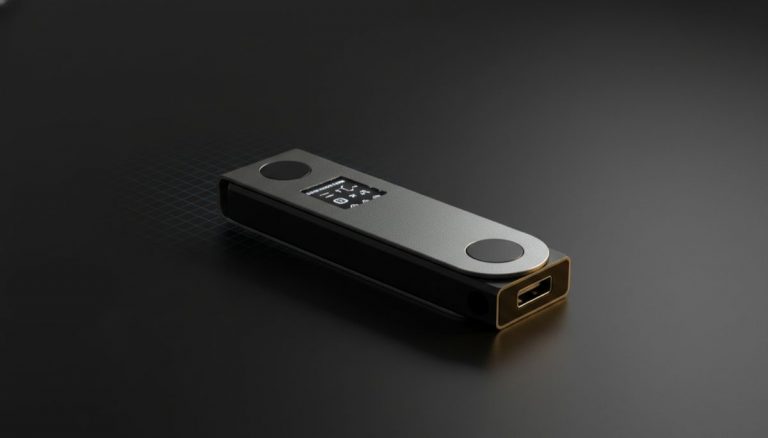
The original Jade launched as an entry-level device with a small color screen, a transparent plastic back panel, and a form factor roughly the size of a car key fob. It did its job, but the screen was cramped for displaying addresses and QR codes, and the plastic construction felt like a prototype next to aluminum competitors.
The Jade Plus addresses every physical complaint. The screen is substantially larger and sharper, making QR code scanning and address verification much easier. The body uses a more refined construction with metal elements, and the camera module is improved for faster QR reads. Internally, both devices run the same firmware and use the same security model — the differences are almost entirely about ergonomics and display quality.
At $100, the Jade Plus sits at an interesting price point: still well below the Passport ($299) or Coldcard MK4 ($150), but enough of an upgrade over the $65 base Jade to justify the premium if you plan to use the device regularly rather than tuck it in a drawer.
Design and Build
The original Jade has a playful, almost hacker-aesthetic design. The transparent back panel exposes the circuit board, which is either charming or cheap-looking depending on your taste. The device is small and light — easy to carry, easy to lose. The directional buttons and select key are functional but not particularly satisfying to press.
The Jade Plus cleans up the design considerably. The metal-accented body feels more premium, and the larger screen transforms the user experience. Reading a full Bitcoin address on the Jade Plus is comfortable rather than a squinting exercise. QR codes rendered on the display scan faster because they have more pixels to work with.
Both devices include a built-in camera for scanning QR codes, which enables fully air-gapped operation — a feature that is unusual at this price range. Most sub-$100 hardware wallets require a wired or Bluetooth connection. The Jade gives you the option to go air-gapped without paying a premium for it.
Setup Process
The recommended setup path uses Blockstream Green, the companion wallet app available on iOS, Android, and desktop. Green walks you through initialization, seed generation, and PIN creation. The process takes about five minutes and is straightforward even for first-time hardware wallet users.
You can also set up the Jade with third-party wallets like Sparrow, skipping Green entirely. The device generates a BIP39 seed phrase (12 or 24 words) that you back up manually. There is no seed card included in the box — you need your own pen and paper or metal backup solution.
The Jade supports SeedQR, allowing you to encode your seed phrase as a QR code for fast import and export. This is particularly useful for the stateless operation mode, where the device does not store any seed at all and you re-enter it each time you use the device. For most users, the standard PIN-protected mode is more practical, but stateless operation is available for those with specific threat models.
Properly backing up your seed phrase is critical regardless of which hardware wallet you use. Our guide on Bitcoin seed phrase security covers the full range of backup methods and threats to consider.
Security Model: The Virtual Secure Element
This is where the Jade diverges from every other hardware wallet on the market, and it deserves a detailed explanation because the approach is genuinely novel.
Most hardware wallets use a dedicated secure element chip — a tamper-resistant piece of silicon designed to store cryptographic keys and resist physical extraction attacks. The Coldcard uses one, the Passport uses one, and the Ledger lineup uses one. The secure element is typically a proprietary chip with closed-source firmware, which creates a trust assumption: you are relying on the chip manufacturer’s security claims without being able to verify them independently.
Blockstream rejected this tradeoff. Instead, the Jade uses what they call a “virtual secure element” built on a blind oracle protocol. Here is how it works:
Your seed phrase is encrypted on the device and split in a way that neither the device alone nor Blockstream’s server alone can reconstruct it. When you enter your PIN, the Jade communicates with Blockstream’s PIN server (the “oracle”) through an encrypted channel. The server provides its half of the decryption key, the device combines it with local data derived from your PIN, and the seed is temporarily decrypted in memory for signing. The server never sees your PIN, never sees your seed, and cannot determine what keys you hold. The device cannot decrypt the seed without the server’s cooperation.
This model has real advantages: the entire stack is open source and auditable, there is no proprietary secure element to trust blindly, and the PIN server adds a rate-limiting layer that resists brute-force attacks even if someone steals the physical device. The tradeoff is that the PIN-based unlock requires network connectivity to reach the oracle server — though you can configure the Jade to use your own self-hosted oracle, or bypass the oracle entirely by using SeedQR or a BIP39 passphrase.
For more context on how different wallet architectures handle key storage and the security tradeoffs involved, see our technical overview of Bitcoin wallet architecture evolution.
Air-Gapped Operation via QR Codes
Despite having Bluetooth and USB-C connectivity, the Jade can operate in a fully air-gapped mode using its built-in camera and screen. In this mode, you construct a transaction on your companion wallet (Sparrow, Green, or another compatible app), display it as a QR code, scan it with the Jade’s camera, review and approve the transaction on the device, and then display the signed transaction as a QR code for the companion wallet to scan and broadcast.
This workflow eliminates the need for any wired or wireless connection between the Jade and your computer or phone. It is the same approach used by the Passport and Keystone, but at a fraction of the price. The original Jade’s small screen makes this process workable but not ideal — animated QR codes on a 1.14-inch display take longer to scan. The Jade Plus significantly improves this experience with its larger screen.
Air-gapped operation is particularly valuable for cold storage setups where the signing device should never have a direct communication channel with a networked machine. Our article on balancing cold storage, hot wallets, and risk management discusses how to structure your holdings across different security tiers.
Compatible Wallets
The Jade works with a wide range of Bitcoin wallet software beyond Blockstream Green:
- Blockstream Green — The default companion app with full feature support including Liquid assets, coin control, and 2FA-protected wallets.
- Sparrow Wallet — Desktop wallet with advanced coin control, PSBT support, and strong privacy features. Works via USB, and via QR for air-gapped operation.
- Electrum — Established desktop wallet with scripting capabilities and wide plugin support.
- Nunchuk — Mobile and desktop wallet focused on multisig coordination and collaborative custody.
- Blue Wallet — Mobile wallet with watch-only support and PSBT signing capabilities.
- Specter Desktop — Multisig-focused wallet designed for use with Bitcoin Core.
- Bitcoin Core — Integration through HWI for users running full nodes.
This compatibility list ensures you are not dependent on Blockstream’s software. Your BIP39 seed can be restored on any standard wallet, and the device supports standard communication protocols (PSBT, xpub export) that work across the ecosystem.
SeedQR and Stateless Operation
The Jade supports a mode called “stateless operation” where no seed material is stored on the device at all. Instead, you keep your seed phrase encoded as a SeedQR — a compact QR code that represents your 12 or 24 words. Each time you want to use the Jade, you scan the SeedQR with the device’s camera, perform your signing operations, and the seed is wiped from memory when you power off.
This approach means a stolen Jade in stateless mode contains nothing of value. There is no seed to extract, no encrypted data to attack, and no PIN to brute-force. Your security depends entirely on protecting the physical SeedQR backup, which you could store in a safe, a bank vault, or a metal plate engraving.
Stateless mode is not for everyday use — scanning a QR code every time you want to check a balance or sign a transaction adds friction. But for a cold storage device that you access a few times a year, it is a compelling security model. For more on how to protect your seed backup, our resource on seed phrase storage best practices covers physical and environmental threats in detail.
Liquid Network Support
The Jade is one of the few hardware wallets that supports Blockstream’s Liquid Network, a Bitcoin sidechain designed for faster settlements and confidential transactions. On Liquid, you can hold and transfer L-BTC (Liquid Bitcoin), Tether (USDt) issued on Liquid, and other Liquid-based assets.
Liquid support is managed through the Blockstream Green app. The Jade signs Liquid transactions the same way it signs Bitcoin transactions, with the addition of confidential transaction blinding. This is a niche feature — most Bitcoin users do not interact with Liquid — but for traders who use Liquid-based exchanges or businesses that settle on the sidechain, having hardware wallet support is a meaningful security improvement over software-only signing.
Pros and Cons
Pros
- Extremely affordable entry point at $65 for the base Jade
- Fully open-source firmware and hardware — no proprietary secure element
- Air-gapped QR code operation available at a budget price point
- Virtual secure element model is novel and fully auditable
- Built-in camera for QR scanning eliminates need for external peripherals
- SeedQR and stateless operation for enhanced cold storage security
- Liquid Network support for sidechain assets
- Wide third-party wallet compatibility
- Bluetooth option for convenient mobile signing when appropriate
- Backed by Blockstream, a well-funded Bitcoin infrastructure company
Cons
- Original Jade’s small screen makes QR scanning and address verification difficult
- 240 mAh battery on the base model drains quickly
- Plastic construction on the original Jade feels less durable than metal competitors
- Virtual secure element requires network connectivity for PIN-based unlock (unless using SeedQR or self-hosted oracle)
- Bluetooth connectivity, while optional, is an attack surface that pure air-gapped devices avoid entirely
- No dedicated secure element chip may concern users who trust the traditional hardware security model
- PIN server introduces a dependency on Blockstream infrastructure (mitigated by self-hosting option)
Who Should Buy the Jade
The Jade is the strongest option for Bitcoin users who want a hardware wallet without spending $150 or more. At $65, it is cheaper than a Ledger Nano S Plus while offering features — air-gapped QR signing, fully open-source code, built-in camera — that most devices at twice the price do not include.
It is also an excellent choice as a secondary device. If you already own a Passport or Coldcard for primary cold storage, a Jade makes a practical signing device for smaller amounts, travel, or as a key in a multisig quorum where you want hardware diversity. The importance of using different hardware vendors in multisig configurations is explored in our analysis of hardware diversity in Bitcoin multisig security.
Open-source advocates will appreciate that both the firmware and hardware are published without proprietary components. Unlike devices that use closed-source secure elements, the Jade’s entire security stack can be audited, compiled from source, and self-hosted.
The Jade is not the best fit for users who distrust any form of wireless connectivity on a signing device (both Bluetooth and WiFi radios are present on the board, though WiFi is used only for initial oracle communication and can be avoided). Users who prefer a traditional secure element for key storage may be more comfortable with the Passport or Coldcard.
Comparison with Alternatives
Jade vs Trezor Safe 3
The Trezor Safe 3 costs around $79 and includes a secure element chip — a notable addition since previous Trezor models lacked one. However, the Trezor’s secure element firmware is not fully open source, and the device does not support air-gapped operation (USB only, no camera, no QR codes). The Jade offers more connectivity options, open-source purity, and the air-gapped QR workflow at a lower price. The Trezor wins on multi-chain support with hundreds of supported assets versus the Jade’s Bitcoin-plus-Liquid scope.
Jade vs Coldcard MK4
The Coldcard MK4 is more than double the Jade’s price at around $150 and targets a different user profile. It uses a traditional secure element, has no Bluetooth, and offers a battle-tested security track record spanning years. The Coldcard is a more conservative choice for users who want a proven device with a dedicated hardware security chip. The Jade counters with its lower price, the blind oracle innovation, QR camera, and Bluetooth for mobile use. For deep cold storage, the Coldcard has the edge on reputation; for versatility and value, the Jade holds its own.
Jade vs Foundation Passport
The Passport costs $299 — nearly five times the base Jade — and delivers a premium experience with aluminum construction, a large sharp display, and zero wireless radios. It is the better device for primary cold storage of significant holdings. The Jade competes as a secondary device, a travel wallet, a multisig key, or a first hardware wallet for users testing the waters. Both are fully open source and Bitcoin-focused, but they target different budgets and use cases. Understanding how to structure cold and hot wallet tiers is covered in our guide on Bitcoin self-custody security, redundancy, and usability.
Verdict
The Blockstream Jade, especially in its Plus variant, is the best value proposition in Bitcoin hardware wallets today. No other device at this price offers fully open-source firmware and hardware, air-gapped QR code signing via a built-in camera, and the innovative virtual secure element model that eliminates reliance on proprietary silicon.
The blind oracle security model will not satisfy everyone. Some users fundamentally prefer a tamper-resistant chip they can hold in their hands, even if they cannot audit its firmware. That is a legitimate position, and those users should look at the Passport or Coldcard instead.
But for the growing number of Bitcoin holders who prioritize auditability, affordability, and open-source principles, the Jade delivers more capability per dollar than anything else on the market. The Jade Plus, with its improved screen and build quality, is the version we recommend for most buyers.
Jade Rating: 7.5/10
Jade Plus Rating: 8.5/10
Ledger vs Trezor: Best Hardware Wallet from the
Bitcoin Wallets & Self-Custody course.
Frequently Asked Questions
What happens if Blockstream’s PIN server goes offline permanently?
If you use the standard PIN-based setup and Blockstream’s oracle server becomes permanently unavailable, you can still recover your Bitcoin using your BIP39 seed phrase on any compatible wallet. The seed phrase is the ultimate backup — it does not depend on Blockstream’s infrastructure. Additionally, the oracle server software is open source, so it can be self-hosted by individuals or community members. Blockstream has also stated they would provide advance notice and migration tools if they ever planned to discontinue the service. You can preemptively eliminate this dependency by using SeedQR or passphrase-based operation instead of the PIN server.
Is the Jade secure enough for large amounts of Bitcoin?
The Jade’s security model is sound from a cryptographic standpoint — independent researchers have audited both the blind oracle protocol and the firmware. However, the physical construction (especially on the base model) is less robust than aluminum devices like the Passport, and the presence of Bluetooth and WiFi radios on the board creates a theoretical attack surface that pure air-gapped devices avoid. For large holdings, consider using the Jade as one key in a multisig setup rather than as your sole signing device. Our guide on multi-signature wallet configurations explains how to distribute risk across multiple devices.
Can the Jade operate without Bluetooth or WiFi?
Yes. You can use the Jade in fully air-gapped mode through QR codes, with no wireless communication at all. The camera scans transaction data from your companion wallet’s screen, and the Jade displays signed transactions as QR codes for the companion wallet to scan. Bluetooth and WiFi are optional connectivity methods — you can disable Bluetooth in settings and avoid WiFi-dependent features entirely. In SeedQR or passphrase mode, even the initial PIN server communication over WiFi is unnecessary.
Does the Jade support passphrases (the so-called “25th word”)?
Yes. The Jade supports BIP39 passphrases, which act as an additional secret appended to your seed phrase to derive a completely separate set of keys. This is useful for creating hidden wallets, adding a layer of plausible deniability, or simply adding another factor to your security setup. The passphrase is entered on the device each time you unlock with it — it is never stored. For a thorough explanation of how passphrases work and their security implications, see our article on wallet security passphrases and recovery best practices.
For a broader perspective, explore our running your own Bitcoin node guide.
{“@context”: “https://schema.org”, “@type”: “FAQPage”, “mainEntity”: [{“@type”: “Question”, “name”: “What happens if Blockstream’s PIN server goes offline permanently?”, “acceptedAnswer”: {“@type”: “Answer”, “text”: “If you use the standard PIN-based setup and Blockstream’s oracle server becomes permanently unavailable, you can still recover your Bitcoin using your BIP39 seed phrase on any compatible wallet. The seed phrase is the ultimate backup — it does not depend on Blockstream’s infrastructure. Additionally, the oracle server software is open source, so it can be self-hosted by individuals or community members. Blockstream has also stated they would provide advance notice and migration tools if they …”}}, {“@type”: “Question”, “name”: “Is the Jade secure enough for large amounts of Bitcoin?”, “acceptedAnswer”: {“@type”: “Answer”, “text”: “The Jade’s security model is sound from a cryptographic standpoint — independent researchers have audited both the blind oracle protocol and the firmware. However, the physical construction (especially on the base model) is less robust than aluminum devices like the Passport, and the presence of Bluetooth and WiFi radios on the board creates a theoretical attack surface that pure air-gapped devices avoid. For large holdings, consider using the Jade as one key in a multisig setup rather than a…”}}, {“@type”: “Question”, “name”: “Can the Jade operate without Bluetooth or WiFi?”, “acceptedAnswer”: {“@type”: “Answer”, “text”: “Yes. You can use the Jade in fully air-gapped mode through QR codes, with no wireless communication at all. The camera scans transaction data from your companion wallet’s screen, and the Jade displays signed transactions as QR codes for the companion wallet to scan. Bluetooth and WiFi are optional connectivity methods — you can disable Bluetooth in settings and avoid WiFi-dependent features entirely. In SeedQR or passphrase mode, even the initial PIN server communication over WiFi is unnecess…”}}, {“@type”: “Question”, “name”: “Does the Jade support passphrases (the so-called “25th word”)?”, “acceptedAnswer”: {“@type”: “Answer”, “text”: “Yes. The Jade supports BIP39 passphrases, which act as an additional secret appended to your seed phrase to derive a completely separate set of keys. This is useful for creating hidden wallets, adding a layer of plausible deniability, or simply adding another factor to your security setup. The passphrase is entered on the device each time you unlock with it — it is never stored. For a thorough explanation of how passphrases work and their security implications, see our article on wallet secur…”}}]}