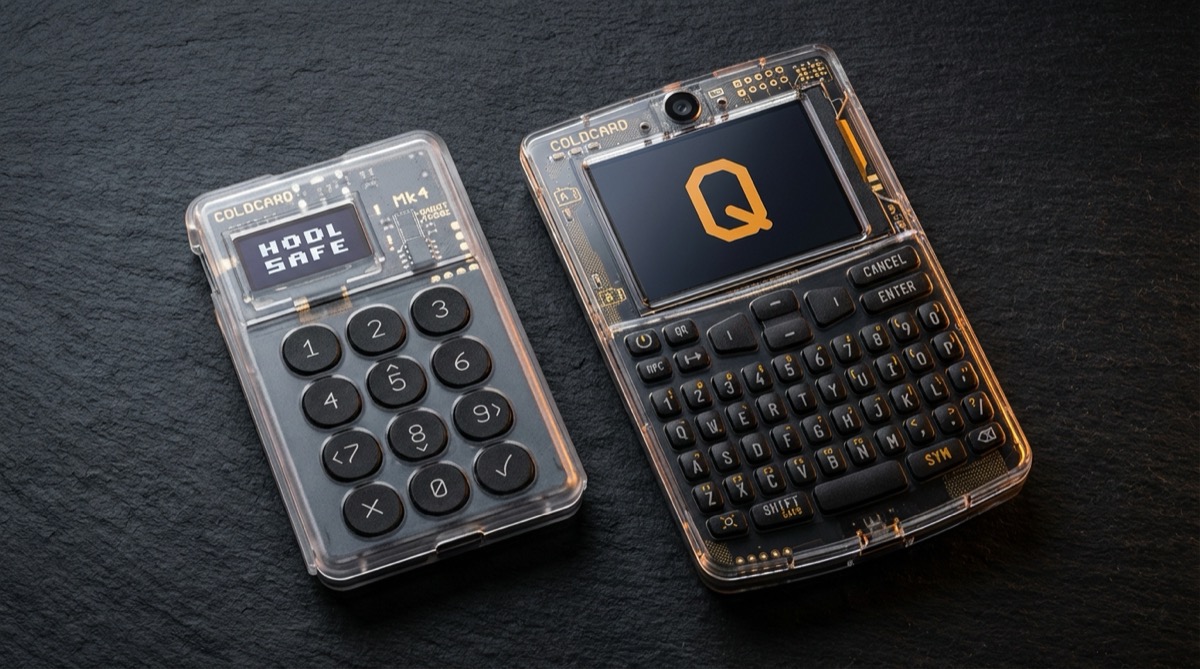
Coinkite makes two Bitcoin-only hardware wallets: the Coldcard MK4 and the Coldcard Q. Both use dual secure elements, open-source firmware, and air-gapped signing via microSD. The MK4 is the compact, proven workhorse at ~$178. The Q is the premium sibling at ~$249, adding a QWERTY keyboard, QR scanner, color screen, and dual microSD slots. If you’ve decided Coldcard is your brand, the remaining question is which model fits your needs. This comparison covers every difference that matters.
Ledger vs Trezor: Best Hardware Wallet from the
Bitcoin Wallets & Self-Custody course.
Side-by-Side Specifications
| Feature | Coldcard MK4 | Coldcard Q |
|---|---|---|
| Price | ~$178 | ~$249 |
| Screen | 128×64 OLED (monochrome) | 320×240 color LCD |
| Input | Numeric keypad (0-9) | Full QWERTY keyboard |
| QR scanner | No | Yes (built-in camera) |
| MicroSD slots | 1 | 2 |
| Power | USB-C (5V, 50mA) | USB-C or 3×AAA batteries |
| Connectivity | USB-C + NFC | USB-C + NFC |
| Secure elements | ATECC608B + DS28C36B (dual) | ATECC608B + DS28C36B (dual) |
| Firmware | Open source | Open source |
| Coin support | Bitcoin only | Bitcoin only |
| Dimensions | 88×52×10mm | 120×75×22mm |
| Weight | ~30g | ~93g (without batteries) |
| Air-gap method | MicroSD | MicroSD + QR codes |
| Trick PINs | Yes | Yes |
| Multisig support | Yes | Yes |
What They Share
Before comparing differences, it’s worth noting what’s identical across both devices. The security model is the same: dual multi-vendor secure elements (Microchip ATECC608B and Maxim DS28C36B), open-source firmware, Bitcoin-only support, air-gapped operation, NFC tap-to-sign, Trick PINs for duress situations, and the same Coldcard security architecture that has been independently audited multiple times.
Both devices support PSBT (Partially Signed Bitcoin Transactions), multisig coordination, and work with the same companion software: Sparrow Wallet, Electrum, and any PSBT-compatible coordinator. Both receive the same firmware updates from Coinkite. The differences are entirely about the physical interface and how you interact with the device.
Where the Coldcard Q Stands Out
QWERTY Keyboard
The Q replaces the MK4’s numeric keypad with a full QWERTY keyboard. This transforms two specific tasks. Entering a BIP39 passphrase (the “25th word”) on the MK4 means cycling through characters one at a time using a number pad — slow and tedious for anything longer than a few characters. On the Q, you type it directly. The same applies to entering seed phrase words during recovery or verification: the keyboard makes text input dramatically faster.
QR Code Scanner
The Q includes a built-in camera for scanning QR codes. This adds a second air-gap communication method alongside microSD. In practice, this means you can sign transactions by scanning a QR code displayed on your computer (generated by Sparrow or another PSBT coordinator) without ever inserting or removing a microSD card. For users who sign transactions frequently, QR scanning is faster and eliminates physical media handling.
Color LCD Screen
The Q’s 320×240 color LCD has more than nine times the pixel count of the MK4’s 128×64 OLED. Text is larger, addresses are easier to verify, and the overall experience feels less cramped. The color display also enables QR code display for signed transactions (your computer’s webcam scans the Q’s screen to receive the signed PSBT). The MK4’s OLED is functional but requires more scrolling for address verification.
Battery-Powered Operation
The Q runs on three standard AAA batteries, enabling true offline operation without any USB connection. You can sign transactions using QR codes and battery power — the device never needs to connect to anything electronic. The MK4 can operate on USB power in a data-free mode (power only, no data transfer), but it requires an adapter or power bank. AAA batteries are available everywhere and eliminate the need for any USB hardware.
Dual MicroSD Slots
Two microSD slots enable workflows that aren’t possible with the MK4’s single slot. For example, you can keep a dedicated card for firmware updates and a separate card for transaction signing. Or use one slot for backup exports and the other for PSBT transfers. It’s a niche feature, but for users managing multiple wallets or complex multisig setups, the convenience adds up.
Where the Coldcard MK4 Holds Its Own
Compact and Discreet
At 88×52mm and 30 grams, the MK4 is roughly credit-card sized and easy to conceal. It fits in a pocket, a small safe, or a safety deposit box without drawing attention. The Q at 120×75mm is significantly larger — roughly the size of a small calculator. If physical discretion matters (travel, home storage, operational security), the MK4’s size is an advantage.
$71 Cheaper
At ~$178 vs ~$249, the MK4 saves you a meaningful amount — especially if you’re building a multisig setup requiring multiple signing devices. Three MK4s for a 2-of-3 multisig costs about $534. Three Qs would run $747. The security model is identical, so the savings don’t come at a security cost.
Simplicity
The MK4’s numeric keypad and smaller screen make it a simpler device with fewer potential points of failure. No camera, no large LCD, no battery compartment. For a device whose primary job is to store keys and sign transactions securely, some users prefer the minimalist approach. Less hardware means less that can break.
Decision Framework: Which Should You Buy?
Get the Coldcard MK4 if:
- You want the strongest price-to-security ratio in a Bitcoin-only wallet
- You’re building a multisig setup and need multiple devices
- Physical size and discretion are priorities
- You don’t use long BIP39 passphrases (or rarely enter them)
- You’re comfortable with microSD-only air-gapped signing
- You prefer a simpler device with fewer components
Get the Coldcard Q if:
- You use a BIP39 passphrase and want to type it on a real keyboard
- You sign transactions frequently and want QR-based air-gapped signing
- Screen readability matters to you — the color LCD is a significant upgrade
- You want battery-powered operation for maximum isolation from external devices
- You manage multiple wallets and benefit from dual microSD slots
- You don’t mind the larger size and higher price
How Both Compare to Non-Coldcard Alternatives
If you’re still deciding whether Coldcard is right for you, here’s how both models compare to the main competition:
The Trezor Safe 5 ($169) offers open-source firmware and a touchscreen at a lower price than the Q, but lacks air-gapped operation, dual secure elements, and Bitcoin-only hardware design. The Ledger Flex ($249) matches the Q’s price but runs closed-source firmware and supports 5,500+ altcoins — a different philosophy entirely.
For air-gapped alternatives, the Keystone 3 Pro offers QR-based signing with a large touchscreen but supports multiple chains. The Foundation Passport is another Bitcoin-only, open-source option with QR and microSD support. See our air-gapped wallets guide for a full rundown.
Verdict
Both Coldcards deliver the same security model — the best available for Bitcoin-only hardware wallets. The choice comes down to interface and workflow. The MK4 is the lean, affordable, proven option that does everything you need without extras. The Q is the comfort upgrade: better screen, better keyboard, QR scanning, and battery power make it a more pleasant device to use regularly.
If you sign transactions monthly or less and want to minimize cost, the MK4 is the right call. If you interact with your signing device weekly, use passphrases, or manage multisig wallets that require frequent signing, the Q’s usability improvements justify the $71 premium.
Coldcard MK4: 8.5/10 — Best value Bitcoin-only signing device.
Coldcard Q: 9/10 — Premium Bitcoin-only wallet with the best air-gapped workflow available.
Frequently Asked Questions
Is the Coldcard Q more secure than the MK4?
No. Both use the same dual secure elements (ATECC608B + DS28C36B), the same open-source firmware, and the same security architecture. The Q adds usability features — a better screen, keyboard, QR scanner, and battery power — but the cryptographic security is identical.
Can the Coldcard MK4 scan QR codes?
No. The MK4 does not have a camera. Air-gapped communication uses microSD cards exclusively. If you want QR-based signing, you need the Coldcard Q, the Blockstream Jade, or another QR-capable device.
Do both Coldcards work with Sparrow Wallet?
Yes. Both the MK4 and Q are fully supported by Sparrow Wallet, Electrum, and any Bitcoin software that handles PSBT files. Sparrow is the most popular companion for Coldcard devices, offering multisig coordination, coin control, and privacy features.
Which Coldcard is better for multisig?
Both work identically for multisig setups. The MK4 is more cost-effective when you need to buy multiple units. The Q is more convenient if you’re the primary signer who interacts with the device frequently, since the QWERTY keyboard makes passphrase entry easier. For a detailed walkthrough, see our multisig setup guide.
See our hardware wallet buying guide and comparison chart for the full market overview.