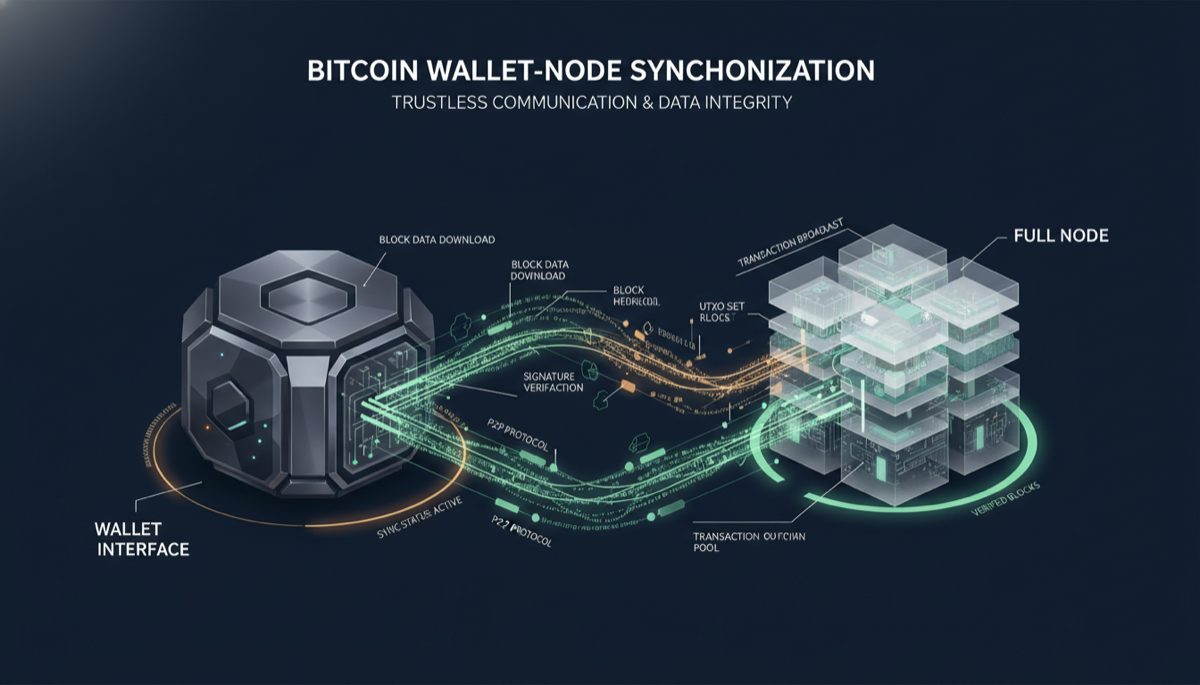
The architecture of Bitcoin wallets and their interaction with nodes represents a fascinating intersection of user experience design and distributed systems engineering. At the heart of this relationship lies the critical mechanism of transaction synchronization, which enables users to maintain an accurate and current view of their Bitcoin holdings while ensuring security and privacy through direct node connections.
The fundamental process of wallet synchronization involves continuous communication between the wallet software and the Bitcoin node. This connection serves multiple purposes: it verifies transactions, monitors the blockchain’s current state, and ensures the wallet’s view of the Bitcoin network remains current. Modern wallet implementations handle this through sophisticated background processes that maintain persistent connections to nodes while managing system resources efficiently.
When examining the technical implementation of wallet-node synchronization, we find a layered approach to maintaining blockchain state. The wallet software typically maintains a local cache of relevant transactions and block headers, while relying on the connected node for full block data and network state validation. This architecture enables rapid transaction detection while minimizing resource usage and network overhead.
Real-time transaction monitoring in Bitcoin wallets implements several key technical mechanisms. The wallet software listens for new blocks and relevant transactions through a combination of ZMQ notifications and JSON-RPC polling. When new transactions or blocks are detected, the wallet performs necessary validations and updates its internal state. This process happens automatically but may occasionally require manual intervention to force a refresh of the wallet’s state.
The relationship between wallet software and full nodes represents a crucial aspect of Bitcoin’s decentralized architecture. By connecting directly to a personal node, users gain significant privacy advantages while contributing to network decentralization. This connection allows for trustless verification of transactions and blocks, eliminating reliance on third-party servers that could potentially compromise user privacy or manipulate transaction data.
Modern Bitcoin wallets implement various optimization techniques to balance resource usage with responsiveness. These include selective scanning of blocks, efficient filtering mechanisms, and intelligent caching strategies. The wallet software typically maintains a local database of relevant transactions and addresses, allowing for quick access to historical data while relying on the node for network-level verification.
Security considerations play a vital role in wallet-node communication protocols. The connection between wallet and node must be authenticated and encrypted to prevent man-in-the-middle attacks and data manipulation. Additionally, the wallet software must validate all received data independently, even when connected to a trusted node, to maintain the trustless nature of the Bitcoin protocol.
User interface design in Bitcoin wallets must carefully balance automation with user control. While automatic synchronization provides convenience, manual refresh options remain important for troubleshooting and verification purposes. This dual approach ensures users maintain control over their wallet’s state while benefiting from automated processes that handle routine synchronization tasks.
Looking to the future, wallet-node communication protocols continue to evolve with innovations like compact block filters and advanced privacy features. These developments aim to improve synchronization efficiency while maintaining or enhancing the security and privacy guarantees that make Bitcoin valuable. As the ecosystem matures, we can expect to see further refinements in how wallets interact with nodes, potentially incorporating new technologies that improve both performance and user privacy.
The ongoing development of Bitcoin wallet architecture demonstrates the ecosystem’s commitment to combining security, privacy, and usability. As these solutions continue to evolve, they will likely incorporate new technologies and methodologies while maintaining the fundamental principles of trustlessness and decentralization that define Bitcoin’s value proposition.
For more on this topic, see our guide on Bitcoin Node Network Discovery and Access.
For more on this topic, see our guide on Bitcoin Privacy: Layer 1 vs Layer 2. Node operators can benefit from understanding Self-Hosted Bitcoin Infrastructure Security.
For more on this topic, see our guide on Hardware Wallet Buying Guide 2026. Verifying transactions yourself requires a node — see Bitcoin Node Sync: Solve Technical Challenges.
Verifying transactions yourself requires a node — see Run a Bitcoin Node: Full Setup Guide.
Full sovereignty starts with your own node — explore Bitcoin Node Privacy and Sovereignty Impact.
Node operators can benefit from understanding Bitcoin Node: Trust vs Verification Balance.
Node operators can benefit from understanding Run a Bitcoin Full Node in 2026.
For a broader perspective, explore our running your own Bitcoin node guide.
Step-by-Step Guide to Setting Up Bitcoin Wallet-Node Synchronization
Connecting your Bitcoin wallet to your own full node is one of the most impactful privacy and sovereignty steps you can take. Instead of trusting third-party servers with your address queries, you validate everything locally. This guide covers the complete setup process from node installation through wallet connection.
Step 1: Set up a Bitcoin full node. Install Bitcoin Core on a dedicated machine or use a node-in-a-box solution like Umbrel, RaspiBlitz, or Start9. Bitcoin Core requires approximately 700 GB of disk space for the full blockchain (as of early 2026) and at least 2 GB of RAM. A Raspberry Pi 4 with an external SSD works well for home use. During initial block download (IBD), the node downloads and verifies the entire blockchain history — this takes 1-3 days on a typical home internet connection depending on hardware.
Step 2: Enable the necessary RPC and connection interfaces. For Sparrow Wallet to connect, your node needs an accessible interface. Bitcoin Core supports several connection methods: the JSON-RPC interface (default port 8332), the Electrum protocol through an Electrum server wrapper (Electrs or Fulcrum), and BWT (Bitcoin Wallet Tracker). Electrs or Fulcrum indexes the blockchain to enable efficient address lookups that wallets require. Install one of these on your node: Electrs is lighter on resources, Fulcrum is faster for queries once indexed.
Step 3: Configure Sparrow Wallet to connect to your node. In Sparrow Wallet, go to File > Preferences > Server. Select “Private Electrum Server” if you installed Electrs or Fulcrum, or “Bitcoin Core” for direct RPC connection. Enter your node’s IP address (or localhost if the wallet runs on the same machine) and port number. If connecting over your local network, use the node’s LAN IP. For remote connections, set up a Tor hidden service on your node to encrypt the connection and avoid exposing your node’s IP address.
Step 4: Verify the connection and initial sync. After connecting, Sparrow displays a connection indicator in the bottom-right corner. A blue toggle means connected. The wallet will begin scanning the blockchain for any addresses associated with your wallet’s keys. For a new wallet, this is nearly instant. For a wallet with transaction history, the initial scan may take several minutes depending on the number of addresses to check and your Electrum server’s indexing speed.
Step 5: Understand the synchronization process. Once connected, your wallet maintains a persistent connection to your node. When a new block is found (approximately every 10 minutes), the node notifies the wallet, which then checks if any transactions in that block affect its addresses. For unconfirmed transactions, the wallet also monitors the mempool through the node. This dual monitoring — blocks and mempool — enables you to see incoming transactions before they confirm and track confirmation progress in real-time.
Step 6: Configure ZMQ notifications for instant updates. Bitcoin Core supports ZeroMQ (ZMQ) notifications that push block and transaction events to connected clients in real-time. Enable ZMQ in your bitcoin.conf file with zmqpubrawblock=tcp://127.0.0.1:28332 and zmqpubrawtx=tcp://127.0.0.1:28333. Wallet software that supports ZMQ receives instant notifications of new blocks and transactions rather than polling the node periodically, reducing latency from seconds to milliseconds.
Step 7: Set up Tor for remote wallet-node connections. If your wallet runs on a different device from your node (e.g., laptop wallet connecting to home node), use Tor to encrypt the connection. On your node, add a Tor hidden service pointing to your Electrum server port. The resulting .onion address provides an encrypted, authenticated connection without requiring port forwarding or exposing your home IP address. Sparrow Wallet natively supports connecting to .onion addresses through its built-in Tor client.
Step 8: Monitor your node’s health and sync status. A wallet is only as reliable as the node it connects to. Monitor your node’s block height (should match the network tip), peer count (at least 8 outbound connections), and disk space usage. If your node falls behind the chain tip, your wallet will not see recent transactions. Set up alerts or check regularly through your node’s dashboard (Umbrel and RaspiBlitz provide web interfaces) or the bitcoin-cli getblockchaininfo command.
Common Mistakes to Avoid
1. Connecting your wallet to a public Electrum server. The default Electrum wallet and some other wallets connect to random public Electrum servers. These servers see every address your wallet queries, allowing the operator to link all your addresses together and associate them with your IP address. This completely undermines on-chain privacy. Always connect to your own node or, at minimum, a server operated by someone you trust, accessed through Tor.
2. Forgetting to install an Electrum server index. Bitcoin Core alone does not support the efficient address lookups that wallets require. Without Electrs, Fulcrum, or a similar indexer, Sparrow Wallet cannot query your node for address balances and transaction history. The Bitcoin Core RPC wallet interface is an alternative but requires importing your wallet’s keys into Bitcoin Core, which many privacy-conscious users prefer to avoid. Install an Electrum server alongside Bitcoin Core for the best experience.
3. Not waiting for initial block download to complete before connecting a wallet. If you connect your wallet to a node that is still syncing the blockchain, the wallet will show incorrect balances — it cannot see transactions in blocks that have not yet been downloaded and verified. Wait until your node reaches the current chain tip before connecting any wallet. Bitcoin Core displays sync progress as a percentage; Umbrel and similar platforms show this on their dashboard.
4. Exposing your node’s RPC port to the internet without authentication. The Bitcoin Core RPC interface with full access can send transactions and manipulate wallet data. Never expose port 8332 directly to the internet. Use RPC authentication (configured in bitcoin.conf with rpcuser/rpcpassword or cookie-based auth), bind the RPC interface to localhost only, and use Tor hidden services for any remote access. A misconfigured RPC interface is a direct path to stolen funds.
5. Ignoring wallet gap limit settings. HD wallets generate addresses sequentially, and the “gap limit” defines how many unused addresses the wallet scans ahead. If you have generated many addresses (perhaps through a merchant payment system or coin control workflow), the default gap limit of 20 may miss some addresses during synchronization. Sparrow Wallet allows you to increase the gap limit in wallet settings — set it high enough to cover all addresses you have generated.
Frequently Asked Questions
Why is my wallet showing a different balance after connecting to my own node?
This typically occurs for one of three reasons: your node has not finished syncing (check block height), your Electrum server index is still building (Fulcrum can take hours to index after initial Bitcoin Core sync), or the gap limit is too low to find all your addresses. First verify your node is fully synced to the chain tip, then check that your Electrum server index is complete, and finally try increasing the gap limit to 100 or higher and rescanning.
Can I run a node on the same computer as my wallet?
Yes, and this is actually the ideal setup for privacy because wallet queries never leave your machine. The main concern is resource usage — Bitcoin Core plus Electrs or Fulcrum plus Sparrow Wallet requires roughly 8 GB of RAM and 700+ GB of SSD storage. On a modern desktop or laptop with sufficient specs, all three run comfortably. On a machine with limited resources, consider running the node on a dedicated device like a Raspberry Pi and connecting the wallet over your local network.
How much bandwidth does wallet-node synchronization use?
After initial block download, ongoing bandwidth usage is modest. Each new block (arriving roughly every 10 minutes) is 1-4 MB. Block header synchronization uses negligible bandwidth. The wallet’s address queries to the Electrum server generate minimal network traffic. Total ongoing usage is typically 10-30 GB per month for a full node with wallet connections, most of which is block relay to peers rather than wallet synchronization specifically.
What happens if my node goes offline while my wallet is open?
Sparrow Wallet gracefully handles node disconnections. The wallet retains its locally cached balance and transaction data, so your view of historical transactions remains intact. New incoming transactions will not appear until the node reconnects and catches up to the chain tip. You can still construct and sign transactions offline using the wallet’s cache, but broadcasting requires an active node connection. The wallet will automatically reconnect when the node comes back online.
Related Resources
- Running a Bitcoin Node: Guide to Self-Sovereignty and Network Participation — Complete guide to setting up and maintaining a full Bitcoin node for wallet synchronization and network support.
- Bitcoin Node Synchronization: Technical Challenges and Solutions — Deep dive into the synchronization mechanisms and troubleshooting common issues with node performance.
- Bitcoin Node Performance: Hardware Requirements and Sync — Hardware selection guide for optimal node performance that directly impacts wallet synchronization speed.
- Privacy and Sovereignty Implications of Running a Bitcoin Node — Analysis of the privacy benefits that wallet-node synchronization provides over third-party server connections.
- Network Discovery and Accessibility in Self-Hosted Bitcoin Infrastructure — Technical guide to making your node accessible to your wallet across different network configurations.